Common Motorola (Moto) Faults & Fixes: Problems, Causes & When to Repair
Direct answer: The most common Motorola phone faults in the UK are cracked screens (especially on Edge curved displays and Razr foldable inner panels), Moto G battery degradation after eighteen to twenty-four months of use, USB-C charging-port wear, screen flicker after a drop, and boot loops triggered by failed system updates. Razr owners also report hinge stiffness and inner-screen crease concerns. This guide covers each fault with practical first-response steps and a clear line on when professional repair is the right call rather than a DIY fix.
Motorola makes dependable, value-led Android phones, and the great majority of Moto G, Edge and Razr faults fall into a small set of well-understood categories. The useful thing about that is most of them can be narrowed down at home with a few simple checks, which means you only pay for a repair when there genuinely is one to do. This guide separates hardware faults from software faults honestly — a factory reset will not fix a cracked Razr inner panel, and no amount of charging-cable swapping will revive a dead battery cell — and points you to the right next step for each. For the cost of any repair this guide recommends, see the Motorola repair costs in the UK hub.
Motorola screen problems
Cracked screen
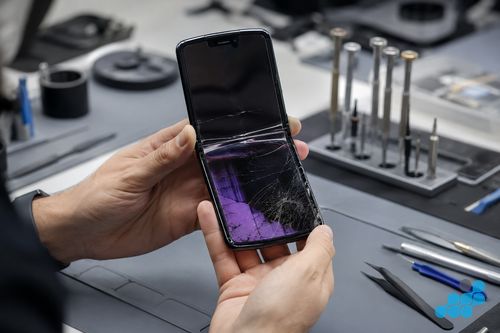
The single most common Motorola fault, and the most decisive: a cracked screen is hardware damage and needs a panel replacement. The only at-home question worth asking is whether the display beneath the glass still works — if it does, the phone is usable in the short term but the crack will spread; if it does not, the handset is effectively unusable. See our cracked screen still works: fix now or wait guide for that judgement, and our Motorola screen replacement prices page for the cost by model. A Razr inner-panel crack should be addressed promptly — debris and hinge stress at a crack will worsen quickly.
Screen flickering or lines
Flickering, horizontal lines or colour bleed after a drop usually point to a damaged display flex or panel rather than a software fault — and on the pOLED (plastic OLED) panels Motorola uses across the Edge and Razr ranges, a knock can crack a driver line without leaving a mark on the glass. First-response checks: rule out an app by restarting the phone in safe mode, and rule out a loose flex by applying gentle pressure — if the flicker responds to a light press on the frame, the connector or panel is the culprit. Persistent flicker needs a screen assessment. See our phone screen flickering causes and fixes guide.
Ghost touch / unresponsive touchscreen
If the screen registers taps you did not make, or stops responding in a band across the display, the digitiser is usually at fault — often after a drop or a cheap screen replacement elsewhere. Clean the screen, remove any screen protector that may be interfering, and if the problem persists in a specific zone, the digitiser needs assessment. See our ghost touch screen causes and fixes guide.
Razr foldable: inner screen crease & delamination
A visible crease down the centre of a Razr inner display is a designed feature, not a fault — the fold-tolerant plastic OLED (pOLED) is engineered to bend at exactly that line thousands of times, and the soft top layer that makes the fold possible is also what makes it more delicate than ordinary glass. What is a fault is delamination, bubble formation, a dead band, or a crack at or near the crease. Those need a professional inner-panel assessment; using a foldable with a delaminating panel risks spreading the damage along the fold line. Telling the normal crease apart from a genuine delamination fault is exactly the kind of check we run during a diagnostic.
Motorola battery & charging problems
Moto G battery draining fast
Rapid drain on a Moto G that previously lasted a day and a half is usually cell wear rather than a rogue app, particularly after eighteen to twenty-four months of use — the large battery makes the loss obvious. First-response checks: look at battery usage in settings to rule out a single power-hungry app, restart the handset, and rule out a background update cycle. If drain persists with normal use, the cell needs replacing. See our Motorola battery replacement costs page.
Motorola not charging
"Won't charge" has three common causes, and ruling them out in order avoids paying for the wrong repair. First, lint and debris packed into the USB-C port is a frequent culprit — carefully clean the port with a dry wooden cocktail stick (never metal). Second, try a different cable and charger to rule out a faulty accessory. Third, if the phone charges only when the cable is held at an angle, the port itself is worn. A port that is physically damaged or still fails after cleaning needs a charging-port repair; a phone that charges slowly but reliably is more likely a degrading cell. See our charging port repair costs guide.
Overheating during charging or gaming
Some warmth under load or during fast charging is normal; a phone that becomes genuinely hot to the touch, throttles hard, or refuses to charge until it cools is signalling a problem. Common causes are a swollen or stressed battery, intensive use while fast-charging, or a blocked chassis. Stop using a phone with a swollen battery and send it in. See our phone overheating causes and fixes guide.
Swollen or bulging battery
A lifting rear cover, a screen pushing out of its frame, or a phone that will not sit flat are signs of a swollen cell — a safety issue, not a wear issue. Stop using the handset, do not attempt to puncture or flex it, and book it in. Our fast-charging safety guide explains why a swollen cell is dangerous and how to handle it.
Motorola performance & software problems
Boot loop or stuck on Motorola logo
A phone that restarts repeatedly or hangs on the Motorola logo has usually suffered a failed system update or a corrupted partition, though in some cases a failing battery or board-level power issue is the cause. First-response steps: force-restart the handset, and if it will reach recovery, clear the cache partition. A persistent boot loop that will not settle needs a professional diagnosis to separate a software fault from a board-level one before you risk a factory reset. See our phone stuck on logo / boot loop fixes guide.
Phone running very slowly after an update
A sluggish handset immediately after a system update is usually background re-indexing and app optimisation that settles over a day or two. If it does not settle, check for a follow-up update, clear the cache for the worst-affected apps, and confirm available storage is not exhausted. Persistent slowdowns after a week of normal use point to either storage wear or a deeper software issue worth a diagnostic.
Camera blurry or app crashing
A blurry photo is often a smudged or scratched lens cover — clean it first. If the camera app crashes on launch, force-stop and clear the app cache. If the image is consistently out of focus or shows artefacts regardless of lighting, the camera module may be at fault, which is a hardware repair.
Motorola Razr-specific faults
Hinge creak, stiffness, or resistance
A foldable hinge develops some character over time, and a small amount of creak or changing resistance can be normal wear. A hinge that becomes stiff, gritty, or reluctant to hold its position mid-fold may have debris in the rail or a wearing mechanism, and that matters because a misbehaving hinge will damage the inner panel. If the hinge feel changes noticeably, have it inspected before it affects the screen.
Razr won't close fully
A Razr that will not close flat may have a hinge obstruction, debris along the fold, or an inner-panel issue preventing the two halves from meeting. Forcing it is the wrong move — a forced close can crack the inner panel. Have the hinge and panel assessed together.
Motorola phone won't turn on
A handset that will not power on may simply have a deeply discharged battery — leave it on a known-good charger for a full twenty minutes before concluding it is dead. If it remains unresponsive, force-restart it. A phone that still will not wake, or that shows no charge indicator at all, may have a board-level power fault or a failed charging IC, which is component-level work rather than a DIY fix. See our phone won't turn on causes and fixes guide, and our board-level repair explainer.
When to send your Motorola for professional repair
The key dividing line is hardware versus software. A factory reset, cache clear or app reinstall can resolve software faults such as boot loops after a bad update, sluggish behaviour or a crashing camera app. None of those will repair a cracked screen, swollen battery, worn charging port, delaminating Razr panel or board-level power fault; those need parts and bench work. Where a fault needs parts or disassembly near the hinge, use a specialist. We separate hardware faults from software faults, confirm the applicable diagnostic terms and quote before work. Standard screen, battery, camera, speaker and button repairs carry the 27-month warranty tier, charging-port and connector work the 9-month tier, and board-level work 120 days. For the full price picture, see the Motorola repair costs in the UK hub and our Samsung and Google Pixel repair guides.
Frequently asked questions
Why does my Moto G battery drain so fast?
Usually cell wear after eighteen to twenty-four months of use — the Moto G's large battery makes capacity loss obvious. Rule out a single power-hungry app in battery settings first; persistent drain with normal use points to the cell. See our Motorola battery replacement page.
Is a crease in a Motorola Razr inner screen normal or a fault?
A centre crease is a designed feature — the fold-tolerant OLED is engineered to bend there. Delamination, bubbles, a dead band, or a crack at the crease are faults that need professional assessment.
Why does my Motorola keep restarting?
Most often a failed system update or corrupted partition, occasionally a failing battery or board-level power issue. Try a force-restart and, if reachable, clear the cache partition; a persistent loop needs a diagnosis to separate software from a board fault before any factory reset. See our boot loop fixes guide.
How do I fix a Motorola that won't turn on?
Leave it on a known-good charger for twenty minutes (deep discharge), then force-restart. If it stays unresponsive with no charge indicator, suspect a board-level power fault or failed charging IC — component-level work, not a DIY fix. See our phone won't turn on fixes guide.
Can a factory reset fix a Motorola screen fault?
No. A cracked panel, flicker after a drop, ghost touch and a delaminating Razr inner display are all hardware faults. A reset resolves software issues but cannot repair physical display or digitiser damage.
Is Motorola Razr hinge creaking covered by warranty?
A small amount of creak can be normal wear; stiffness, grittiness or a hinge that will not hold position may indicate debris or wear that should be inspected, because a misbehaving hinge can damage the inner panel. Have any noticeable change in hinge feel assessed.
When does a Motorola fault need professional repair rather than a DIY fix?
When it needs parts or any disassembly — a cracked screen, swollen or worn battery, damaged charging port, delaminating Razr panel, or a no-power board fault. Software faults (boot loops, sluggish behaviour, app crashes) can often be fixed at home; hardware faults and anything near the hinge should be sent in. Book at /repair/phone/motorola.