GoPro Won't Turn On or Charge: Causes & Fixes (UK 2026)
Quick triage: A GoPro that won't turn on or charge is most commonly a depleted or faulty battery (the lowest-cost fix, from £29.95), a worn USB-C charging port with bent pins or debris, or — in the more severe cases — motherboard failure, often on the back of liquid ingress or a drop. Work through the steps below before sending it in: if the battery or port is the culprit, the repair is modest; if the motherboard is at fault, the GoPro repair cost table helps you decide whether repair is worth it for your model. Free diagnostics on standard faults mean there is no cost to post it in for assessment if the cause is unclear.
A GoPro that will not wake up is one of the most frustrating faults because it gives you nothing to work with — no screen, no beep, no error code, just a dead black brick. The good news is that "won't turn on" is a symptom with a short, knowable list of causes, and most of them are cheap and reversible. This page walks a structured triage — battery, then charging port, then door contacts, then firmware, then motherboard — so you can tell whether you are looking at a £29.95 battery or a serious board issue before you spend anything. For the full menu of GoPro prices, see the GoPro repair cost hub, and for the general principles across devices, our device won't turn on guide.
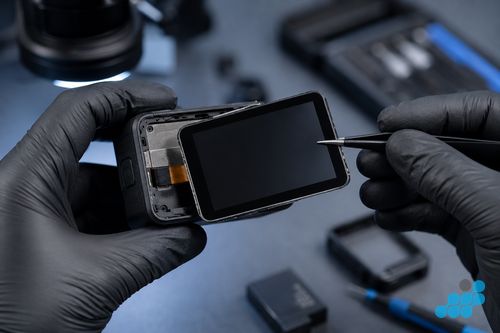
1. Dead or swollen battery
The single most common reason a GoPro will not turn on is the battery, and it is also the lowest-cost fix on the menu, so it is always the first thing to rule out. The typical story is that the camera worked fine last time you used it, sat unused for a few weeks, and now refuses to wake — a deeply discharged cell that will not pull enough current to boot the camera, even on a charger. The more serious variant is a swollen battery: the cell has puffed up through age, heat or over-discharge, and a swollen cell will often trip its own protection circuit and refuse to deliver power at all, even though it still holds a charge on paper. Signs of swelling are a battery that no longer sits flat, a door that is hard to close, or a visible bulge in the cell.
The home test is simple: if you have a known-good second battery (or a friend with the same Hero model), swap it in. If the camera boots on the fresh cell, the battery is your culprit and a £29.95–£49.95 replacement resolves it. If the camera still refuses to wake with a known-good battery fitted, move to step 2 — the fault is further down the chain. A visibly swollen battery should not be used or charged at all; it is a fire risk and it needs a specialist to remove and replace it safely.
2. Faulty USB-C charging port
If the battery is not the fault, the USB-C charging port is the next most likely culprit. GoPro's USB-C port takes a lot of abuse — repeated plug cycles, beach sand, pocket lint, and the sideways strain of a cable knocked while charging — and the result is bent or corroded contacts inside the port that no longer deliver a clean charge. The classic signs are a cable that no longer "clicks" confidently into the port, a charging indicator that flickers or appears only when the cable is held at an angle, or a battery that refuses to gain any charge at all even after hours on the cable.
A visual check under a bright light (a phone torch works) often reveals the problem — debris packed into the port, or a bent contact pin. You can attempt to remove loose debris carefully with a non-metallic pick, but do not scrape the contacts with anything metal, which can short and damage the board. If the port is mechanically worn or corroded rather than just dirty, it needs replacing — £24.95–£44.95 depending on model, carrying the 9-month connector tier because it is a connector rather than a mechanical component.
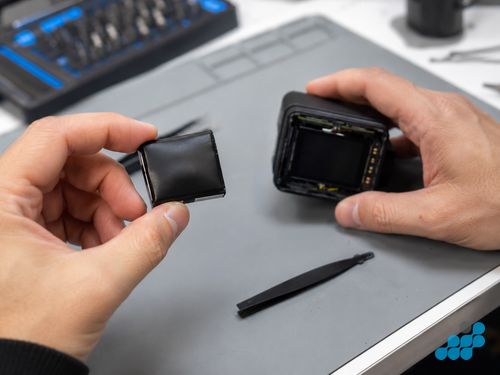
3. Battery door contacts
An often-overlooked cause is the battery door itself. The door does not just hold the battery in; on some Hero generations its contacts and latching position complete the power path, and a door that is bent, corroded at its contacts, or not latching fully can prevent the battery from connecting even when the cell and the port are both fine. The symptom is a camera that is intermittent — it turns on sometimes and not others, or turns on and then dies with a knock — rather than one that is completely dead. A battery door replacement is among the lowest-cost fixes on the menu (£14.95–£24.95), and ruling it in or out is a matter of inspecting the door contacts and confirming the door latches cleanly.
4. Firmware crash
Sometimes the hardware is fine and the camera is simply stuck — a firmware crash that has left it in a state where it will not boot, often presenting as stuck on the GoPro logo, a boot loop, or a screen that lights and immediately goes dark. Before concluding the board is dead, it is worth attempting a forced firmware reset. The exact sequence varies by Hero generation, so check GoPro's own support page for your model, but the general pattern is: remove the battery and any SD card, disconnect from power, hold the power/mode button down for an extended hold (often around ten seconds) to discharge residual power, then refit the battery and attempt a clean boot. Where a manual firmware re-flash is supported for your model, a fresh copy of the firmware on a freshly formatted SD card can recover a camera that is otherwise bricked at the software level. If none of that brings it back, you are looking at hardware.
5. Motherboard failure
The last and most serious cause is the motherboard — a board-level failure that prevents the camera from booting regardless of battery, port or door. This is most often the consequence of something else that has happened to the camera: liquid ingress that has corroded a rail, a drop that has cracked a solder joint, or a short that has killed a charging IC. The signs are a camera that is completely unresponsive to a known-good battery and a clean port, often with visible corrosion around the connectors if water was involved. A motherboard repair is the dearer end of the GoPro menu — from £64.95 on a Hero 7 White up to £109.95 on a Hero 13 Black — and it carries the 120-day board-level guarantee rather than the 27 months that applies to battery, screen and lens work. Whether it is worth it depends on the model: on a current Hero 12 or 13 it often is; on an older Hero 5 or 6 it can approach the camera's residual value, which is exactly the decision the free diagnostic helps you make.
Repair costs for each fault
Representative pricing for a current model (Hero 13 Black) and a mid-range model (Hero 10 Black), so you can see the spread. For the full per-model table across all twelve Hero generations, see the GoPro repair cost hub — the complete list is not repeated here.
| Fault | Hero 13 Black | Hero 10 Black | Guarantee tier |
|---|---|---|---|
| Battery | £49.95 | £39.95 | 27 months |
| USB-C charging port | £44.95 | £34.95 | 9 months (connector) |
| Power / won't turn on | £34.95 | £29.95 | 27 months |
| Motherboard | £109.95 | £94.95 | 120 days (board-level) |
When to send it in
If the home triage points clearly at a battery or a dirty port and you have ruled those out, or if the camera is completely unresponsive to a known-good battery and a clean port, it is time to post it in. celltech offers free diagnostics on standard faults (battery, port, door), so there is no cost to find out which of the five causes above is actually at play before you commit to a repair. Book at /repair/gopro, remove the battery and SD card, and pack the camera in bubble wrap inside a rigid box with a note of your booking reference and the symptom (when it stopped working, what you have tried, any water or drop involvement). Post tracked and insured via Royal Mail Special Delivery Guaranteed. See our packing guide and, if water is suspected, our GoPro water damage page.
Remove the SD card and any mount; the lens cover is the most impact-sensitive part — pack screen-side against foam.
The guarantee is tiered to the fault: 27 months on a battery, screen or lens repair; 9 months on a USB-C connector; 120 days on board-level or motherboard work. We match the tier to the repair type rather than over-promising on the work that is genuinely harder to guarantee.
Frequently asked questions
Why won't my GoPro turn on?
Most commonly a depleted or faulty battery, a worn USB-C charging port, or a battery door that is not latching cleanly — all cheap to fix. Less commonly a firmware crash (often recoverable with a forced reset) or a motherboard failure. Work through the triage above.
How do I know if my GoPro battery is dead vs the camera is broken?
Swap in a known-good battery from the same Hero model. If the camera boots on the fresh cell, the battery is the fault (a £29.95–£49.95 fix). If it still will not wake, the fault is the port, the door contacts, the firmware or the board.
Can a GoPro be repaired if it won't charge?
Yes — usually it is the USB-C port (£24.95–£44.95, 9-month connector tier) or the battery, both repairable by post. A free diagnostic confirms which before you commit.
Is a GoPro motherboard repair worth it?
On a current Hero 12 or 13, usually yes (£94.95–£109.95, 120-day board tier). On an older Hero 5 or 6 it can approach the camera's residual value — the free diagnostic reports the realistic outcome so you can decide honestly.
How do I do a forced firmware reset on a GoPro that's stuck on the logo?
The exact sequence varies by Hero generation, so check GoPro's support page for your model. The general pattern: remove the battery and SD card, disconnect from power, hold the power/mode button for an extended hold to discharge residual power, then refit the battery and attempt a clean boot. Where supported, a manual firmware re-flash from a freshly formatted SD card can recover a software-bricked camera.
How much does it cost to replace a GoPro battery in the UK?
From £29.95 on older models to £49.95 on the Hero 13 Black — see the GoPro repair cost hub for the full table. Battery replacement carries the 27-month guarantee.