PSVR2 Not Tracking? Causes & Fixes (UK 2026)
Direct answer: PSVR2 tracking failure has three common causes: environmental (the room is too dark, too bright, too reflective, or the play area is too small), consumable (dirty or scratched headset cameras and lenses), and hardware (a failed tracking camera, motion sensor, or damaged tether cable). Work through the free fixes in order below — most owners are back tracking within minutes. If the drift persists after all of them, it is a hardware fault and a repair.
PSVR2 tracking problems can come from the play environment, dirty lenses or cameras, settings, cables or hardware. This guide works through safe at-home checks before the hardware faults that need bench assessment. If the checks point to hardware, see our PSVR2 repair cost page.
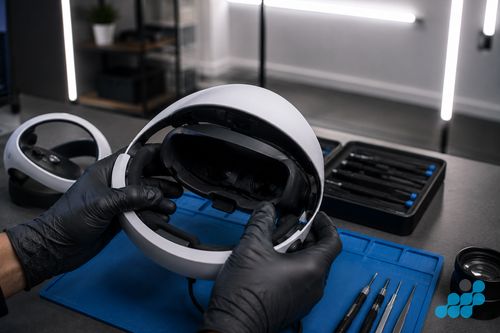
Quick fixes to try first
Run through these in order. They resolve the majority of tracking complaints and cost nothing.
- Power-cycle the headset and PS5. Fully shut down the PS5 (not just rest mode), disconnect and reconnect the PSVR2, and restart. A remarkable number of tracking gremlins are cleared by a clean reboot.
- Sort the lighting. Avoid pure darkness and direct sunlight or bright lamps in shot. A naturally lit room — not pitch black, not harshly lit — tracks best.
- Remove reflective surfaces. Mirrors, glossy screens and glass picture frames bounce the tracking cameras' view and cause drift. Cover or reposition them.
- Define a clear play area. Re-run the play-area setup so the headset has a consistent boundary, and clear obstacles it might confuse for the floor or walls.
- Clean the headset cameras and lenses. A microfibre cloth and a gentle lens cleaner on the outward-facing cameras and the fresnel lenses clears the smudges that quietly wreck tracking.
- Check for a firmware update. Sony ships tracking improvements in firmware — make sure the headset and controllers are fully up to date.
Lighting and play-space causes
Tracking is an optical system, so the room is the first suspect. Pure darkness gives the cameras nothing to lock onto; harsh direct light or sunlight creates glare and blown-out areas; and reflective surfaces — mirrors, TV screens, glass-fronted pictures — introduce ghost references that pull the headset off true. A play area that is too small, or that has changed since you last ran setup, also confuses the boundary logic. If tracking comes and goes depending on time of day or where you face, it is almost certainly environmental.
Dirty or scratched lenses & headset cameras
The outward-facing tracking cameras on the headset do the positional work, and they are surprisingly easily obscured by fingerprints, dust or condensation. A gentle clean with a clean microfibre cloth (and lens cleaner if needed) often restores tracking immediately. A scratched fresnel lens, by contrast, is a different matter — it can produce a persistent blur or halo that no amount of cleaning fixes, and it needs a lens repair (see PSVR2 repair cost).
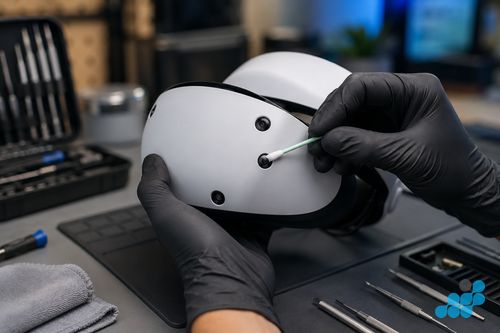
When it's a hardware fault
If you have worked through every free fix and the headset still drifts, recentres by itself or drops tracking entirely, the fault is likely one of three hardware failures: a faulty tracking camera on the headset, a failed motion sensor (IMU), or damage in the tether cable causing intermittent data. These do not resolve with software or cleaning — they need a bench diagnosis and a component repair. That is the point to stop troubleshooting and book it in.
Getting a PSVR2 tracking fault repaired
Celltech repairs PSVR2 by post. Book the headset, choose a suitable tracked delivery service, and we confirm the diagnostic terms and quote before work. Tracking-camera and sensor repairs carry the 27-month warranty tier; a tether-cable fault carries the 9-month connector tier. Full pricing is on our PSVR2 repair cost UK page, and the wider PlayStation picture is in our console repair cost hub and PS5 repair guide. The mail-in process is covered in our mail-in repair guide.
Reading the fault: environment, optics or hardware?
Environmental, optical and hardware faults can produce similar symptoms. Working through the checks in order helps avoid booking the wrong repair.
Environmental drift — the time-of-day test
Environmental tracking faults have a tell-tale pattern: they come and go with conditions. If tracking is solid in the evening but drifts when afternoon sunlight falls across the play area, or only fails when you face a particular wall with a mirror or glossy TV, the cause is the room, not the headset. The fixes are free — stabilise the lighting to a consistent, naturally-lit level (neither pitch black nor harshly lit), cover or reposition reflective surfaces, and re-run the play-area setup so the headset re-learns a clean boundary. Tracking that is reliably bad regardless of room, time of day or facing is the signature that points away from the environment.
Optical causes — the cleaning threshold
The outward-facing tracking cameras and the fresnel lenses are the headset's eyes, and they are easily obscured. A gentle microfibre clean (with lens cleaner if needed) of the cameras often restores tracking at once — this is the single highest-value free fix in VR. The threshold for suspecting something more is consistency after cleaning: if the cameras are spotless and tracking still fails in the same way, optics are not the cause. A scratched fresnel lens is the exception — it produces a lasting blur or halo no cleaning can fix, and that is a lens repair on our PSVR2 repair cost page.
Hardware faults — the consistency signature
A genuine hardware tracking fault is consistent: it persists after a power-cycle, a lighting fix, a camera clean, a play-area reset and a firmware update, in every room and at every time of day. The usual culprits are a failed tracking camera on the headset, a failed motion sensor (IMU), or intermittent data from a damaged tether cable. These do not respond to software or cleaning — they need a bench diagnosis. A tracking camera or sensor repair carries the 27-month tier; a tether-cable fault carries the 9-month connector tier; we tell you which before you commit. Persistent recentre snaps (the headset briefly losing its optical lock and jumping back) are a strong pointer toward a sensor or cable fault rather than the room.
Headset tracking vs controller tracking: which has failed?
Splitting the symptom in two narrows the cause quickly. If your view drifts, judders or re-centres itself while you are sitting still, the headset's own outward-facing cameras or the play-space lighting they rely on are the suspect — that is environment or optics territory. If the headset view is rock-solid but your Sense controllers float off, vanish or jump, the fault sits with the controller tracking ring or its LEDs, which is a controller repair rather than a headset one. The tell is to hold one controller perfectly still: if the headset holds but the controller creeps away, the controller is the problem; if the whole room shifts, look to the headset cameras and lighting first.
PSVR2 tracking FAQ
Why does my PSVR2 keep losing tracking mid-session?
Usually an environmental change — shifting light (sunlight falling on the play area), a new reflective surface, or a camera obscured by condensation after a long session. Power-cycle, stabilise the lighting, clean the cameras and re-run the play-area setup. If it still drops, it may be a hardware fault.
Does PSVR2 need a minimum light level to track correctly?
It needs some structured light to lock onto — pure darkness tracks poorly. A naturally lit room that is neither pitch black nor harshly lit works best. Avoid direct sunlight and glare on the play area.
Can dirty or scratched lenses and headset cameras cause tracking problems?
Yes. Dirty cameras are a very common and entirely free fix — a microfibre clean often restores tracking at once. A scratched fresnel lens, however, produces a lasting blur that cleaning cannot fix and needs a lens repair.
How do I reset PSVR2 tracking and re-calibrate the play area?
Power-cycle the headset and PS5, then re-run the play-area setup from the PSVR2 menu so the headset re-learns a clean boundary. Clear obstacles and reflective surfaces from the space first so the calibration is accurate.
My PSVR2 drifts or recentres by itself — what causes that?
Drift (slow creep in one direction) is often lighting or a reflective surface; a sudden recentre is often the headset briefly losing its optical lock and snapping back. Clean the cameras, fix the lighting and re-run setup. Persistent drift after that points to a sensor or cable hardware fault.
Can a firmware update fix PSVR2 tracking issues?
Sometimes. Sony ships tracking and stability improvements in firmware, so keeping the headset and Sense controllers fully up to date is a genuine troubleshooting step — but it will not fix a dirty camera, a scratched lens or a failed sensor.
Is constant tracking failure a hardware problem that needs repair?
Only once the free fixes are exhausted. If tracking still fails after a power-cycle, lighting fix, camera clean, play-area reset and firmware update, the fault is likely the tracking camera, a motion sensor or the tether cable — and that is a hardware repair.
How much does a PSVR2 tracking sensor or camera repair cost?
Tracking-camera and sensor repairs are quoted individually after a diagnostic, and they carry the 27-month guarantee tier. See the full fault-by-fault breakdown on our PSVR2 repair cost UK page.