Direct answer: If your Fitbit won't charge, first clean the charging pins and device contacts, reseat it firmly in the dock, and try a different USB port and cable — dirty or corroded contacts are the most common cause. If it still won't charge, it is usually a worn charging dock or contacts (a repair) or a battery that has failed after 18–24 months. The quickest tell: a charger fault means little or no reliable charge response, while a battery fault means it charges but then drains in hours.
There is a particular sinking feeling when a Fitbit goes dark on the dock and stays dark — the tracker that has counted your steps, watched your sleep and nagged you to move just stops, and the instinct is to assume the battery has finally died. Hold that thought, because it is usually wrong. Fitbit's charger is a proprietary affair: a little cradle with spring-loaded pins that the tracker clips onto by magnet, and that clever, fiddly arrangement is exactly where most "won't charge" faults actually live. The pins oxidise, lose their springiness or sit at a hair's-breadth misalignment; the contact pads on the back of the device tarnish to match. Work through the free checks below first, then use the simple charger-versus-battery test that follows — because backing the wrong horse here costs real money. For the wider price picture, see the full Fitbit repair price guide.
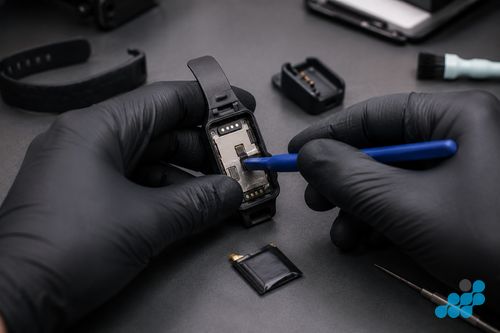
Fitbit won't charge? Start with these free checks
Before anything else, work through these in order. They cost nothing and they clear the majority of "won't charge" cases without a repair.
Clean the charging pins and device contacts
The two halves of the connection — the sprung pins in the cradle and the metal pads on the tracker's back — both collect a fine glaze of sweat, skin oil and pocket lint, and it takes very little of that to break the circuit. Pull the dock from its cable, then work over the pins and the device pads with a dry, soft-bristled toothbrush, or a cotton bud just kissed with isopropyl alcohol. The watchword is damp, never wet — you want to lift grime, not flood the contacts — and let it dry completely before clipping back together. More Fitbits come back to life on this one step than on anything else we do.
Reseat the device firmly in the dock
Those magnets are helpful but lazy — they will happily snap the tracker into a slightly crooked seat where only some of the pins meet their pads. Push the Fitbit home with intent until you feel it sit flush and square, not perched at a tilt. If the only way to get a charge symbol is to hold it at one awkward angle, the magnets are not the issue: a pin has bent or a pad has worn, and that sends you to the repair section below rather than back to the cradle.
Try a different USB port, charger and cable
Remember the dock is only the last few centimetres of the circuit — the wall end matters just as much. Move to a plain USB socket on a computer or a simple 5V plug rather than a beefy fast-charger, and swap in a spare cable if you have one. This part trips people up: a tiny tracker draws a trickle, and some USB-C PD bricks never complete the low-current handshake it needs, so a charger that fills your phone in an hour can leave a Fitbit stone dead. Proving the wall side this way takes a minute and rules out a whole category of false alarm.
Restart the Fitbit
Now and then the tracker is taking charge perfectly well but a frozen interface refuses to show it. Run the restart for your model — the Fitbit app spells out the exact button steps device by device — and put it back on the dock. If it wakes up and charges normally, you are done and dusted; if the screen is still blank, carry on to the diagnosis below.
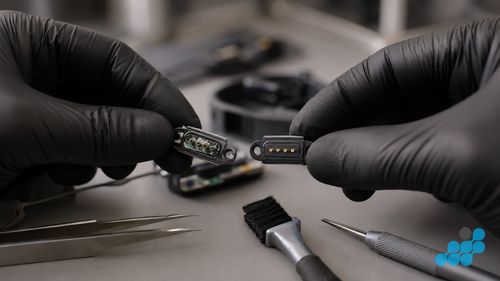
Is it the charger or the battery? How to tell
Get this call right and you stop yourself paying for the wrong fix. A dead dock and a dead cell wear the same disguise — a tracker that simply will not run — but their symptoms diverge once you know what to watch for, and which way you read them decides whether you need a charging repair, a battery, or nothing at all.
| Symptom | Likely points to |
|---|---|
| No charge response at all — no icon, no buzz, no LED | Charger / dock / contacts |
| Charges only when held at one angle | Charger / dock / contacts (bent pin) |
| Visibly corroded, green or bent dock pins | Charger / dock / contacts |
| Intermittent — charges, then stops, then charges | Charger / dock / contacts |
| Charges fully but drains in hours | Battery |
| Sudden capacity drop after months of normal life | Battery |
| Won't hold an idle charge overnight | Battery |
| Bulging back / lifted display | Battery (safety — stop using) |
The quick version: a charger fault gives you no dependable response at all — the tracker acts as though the dock were never there. A battery fault is the opposite — it drinks the charge in greedily, then empties within hours of leaving the cradle. If the table steers you towards the cell, the battery replacement cost spoke has the per-model figure; if it steers you towards the dock or the contacts, keep reading.
The most common Fitbit charging failures
Here is what we actually see, roughly most-common first. Top of the list: the dock pins corroding from sweat — the moisture that sits against your wrist all day rides into the cradle when you charge, and a tiny DC voltage across damp metal drives electrolytic corrosion, which is why those pins end up green-tinged or pitted. Next come bent pins, almost always from a careless clip-in or a knock. Third, the same corrosion playing out on the tracker's own contact pads, tarnishing them dull. Fourth, a cable that has frayed or fatigued at the dock head or the USB plug, quietly breaking the circuit. And fifth, the genuine article — a cell worn down after 18–24 months of daily charge cycles, which is a battery job, not a charging one. Working out which of these you are facing is precisely what the table above is for.
When it's a repair job (and what it costs)
When the free checks have drawn a blank and the diagnosis lands on a real fault, that is the moment a repair earns its keep. Charging-port and dock-contact work is billed as the charging repair; a spent cell is billed as a battery replacement. We will not pin a single headline number here, because it varies by model — the battery replacement cost spoke carries the cell figure, and the full grid on the Fitbit repair price guide carries the charging/dock figure for yours. Charging and connector work sits on the 9-month guarantee tier; a battery replacement sits on the full 27-month guarantee. And because standard repairs are diagnosed under the stated terms, you pay only once the real fault is confirmed — so reading the symptoms wrong at home never lands on your bill.
If it got wet
One scenario deserves its own flag. If the Fitbit took on water — a swim past its depth rating, an accidental dunk, or just months of heavy sweat seeping in — and then quit charging, treat it as water damage rather than an ordinary charging fault. Leave it off the dock, resist the urge to switch it on, and keep heat well away: a hairdryer only drives moisture deeper and can warp the display. If salt water was involved, a quick rinse in fresh water actually helps; shake out the excess gently and send it in to be assessed. Water-damage work is billed as such, on the 120-day guarantee tier. For the first-response basics, see what to do if your device got wet.
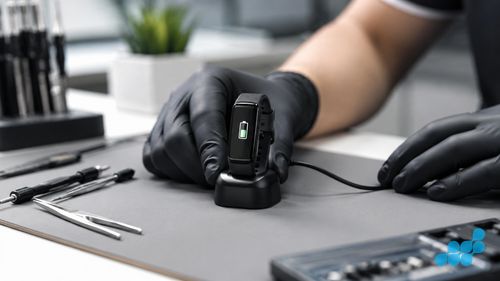
How celltech fixes Fitbit charging faults
Book online, arrange suitable tracked inbound postage using the order instructions, and review the return-delivery terms confirmed for the order.
Under the bench lamp the diagnostic teases apart three things that look identical from your sofa: tarnished or pitted pads on the tracker, corroded or bent pins on the dock, and a cell that has simply run out of road. The first two are a charging repair, the third a battery replacement — and every so often the test shows the free checks alone would have sorted it, at which point we say so rather than invoice you for a fault that was not there. That is the whole case for sending it to people who know these trackers instead of binning one: diagnostics, a fixed quote up front, and not a penny charged for a non-fault, when so many "dead" Fitbits are a single clean contact away from working.
FAQ
Why won't my Fitbit charge?
Usually the dock pins or the device pads have gone dirty, corroded or oxidised — sweat sets off electrolytic corrosion across the contacts. Less often it is a bent pin, a worn cable, or a cell that has given out after 18–24 months. Begin with the free clean-and-reseat checks above.
How do I clean my Fitbit's charging contacts safely?
Take the dock off its cable, then go over the dock pins and the tracker's pads with a dry, soft brush or a cotton bud barely dampened with isopropyl alcohol. Keep it damp, not wet, and let everything dry fully before you clip it back on to charge.
Is my Fitbit not charging because of the battery or the charger?
No response on the dock at all usually means the charger, dock or contacts; a full charge that vanishes within hours usually means the cell. The table back in the “Is it the charger or the battery” section sets out the giveaway symptoms side by side.
My Fitbit charges but the battery drains within hours — what's wrong?
That is the signature of a tired cell, faded after 18–24 months of daily cycles. The battery replacement cost spoke lists the per-model price.
The charging pins look corroded or bent — can that be fixed?
Yes — green or bent dock pins and tarnished pads on the tracker are a charging/connector repair on the 9-month guarantee tier. The full price guide shows the charging figure for your model.
My Fitbit got wet and won't charge — what should I do first?
Keep it off the dock, leave it switched off, and apply no heat. Handle it as water damage and send it in to be assessed on the water-damage tier. The what to do if your device got wet guide has the immediate steps.
Can you fix a Fitbit charging problem by post?
Book online, arrange suitable tracked inbound postage using the order instructions, and review the return-delivery terms confirmed for the order.
How much does a Fitbit charging repair cost?
Charging and connector repairs come from our published Fitbit price list — check the charging column on the full price guide for your model — and carry a 9-month guarantee. If the cell turns out to be the real problem, that is a separate battery replacement on the 27-month tier.
Ready to send yours in? Book a Fitbit charging repair. For structural parallels, see our Apple Watch charging troubleshooting and more charging troubleshooting.