Garmin Watch Charging & Won’t-Turn-On Fixes
Direct answer: Most Garmin "won't charge" problems are dirty charging contacts, a faulty cable, or a watch that has frozen — clean the contacts with a dry brush, try a different cable and power source, and force a restart. If it still won't charge or turn on, the likely culprit is the charging port, the soldered battery, or water ingress, all of which celltech repairs by post. Charging-port and connector repairs carry the 9-month tier and are priced per model from our live price list.
A Garmin that won't take charge feels like an emergency, and understandably so — this is the watch logging your training load and pointing you home off-trail, not a bracelet you can shrug off for a week. Here is the part that should lower your blood pressure, though: on the bench we see far more "dead" Garmins revived by a brush and a clean cable than by a soldering iron. The four spring-loaded pins of the charging clip, the contact pads on the caseback, a tired cable, a watch locked in a firmware freeze — any of those will starve the battery while the hardware underneath is perfectly sound. So the sensible order is triage before booking: run the free checks first, and only if they all fail do you cross into genuine hardware territory — the charging port, the cell, or water that has worked past a seal. This page covers both halves. For the full Garmin price picture, see the Garmin watch repair cost hub.
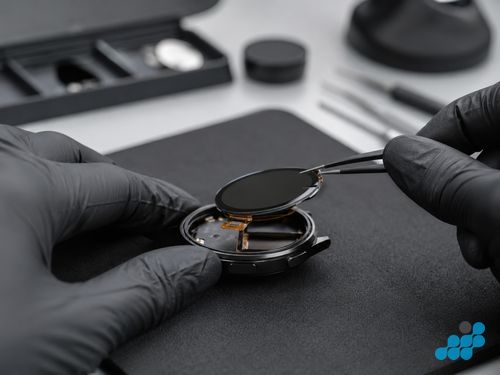
Try these first — five-minute fixes
Clean the charging contacts
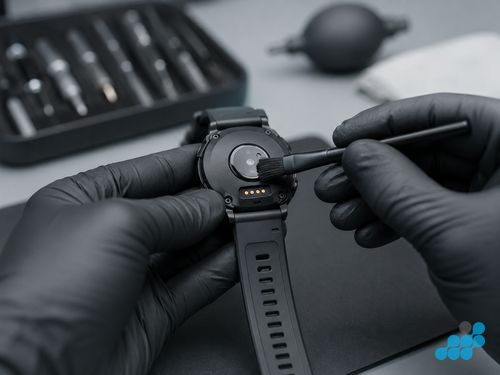
Garmin moved most of its range onto a four-pin charging clip that bites onto a row of flat gold contacts on the caseback (a few older lines use recessed pads instead). Those contacts live right where your skin sweats, and that is the problem: salt from a hard run or an open-water swim, sunscreen, soap film and dried grime build an invisible insulating layer across the pins long before anything mechanical fails. Brush the caseback contacts and the clip itself with a soft, dry toothbrush; for a baked-on salt crust, roll a cotton bud lightly wetted with isopropyl alcohol across each pad and let it dry completely. We have lost count of the "completely dead" Fenix and Forerunner watches that woke up the moment that film was lifted — nothing was broken, the current simply had nowhere to flow.
Check the cable, cradle and power source
The clip-on cable is the part most likely to have quietly given up — the flex point where it meets the connector head fatigues, and the sprung pins inside the clip corrode or lose tension. Borrow or buy a second Garmin cable, plug it into a wall adapter you know works rather than a sleepy laptop port, and watch for the charge icon. The classic tell is a watch that only charges if you prop the cable at one exact angle, or that pulses on and off — that is the cable nagging you, not the watch. It is the easiest variable to swap, so eliminate it before you assume the worst.
Soft reset / force restart
Sometimes the battery is fine and the watch has simply hung — the screen stays black and you read that as flat. A forced reboot clears it. The button hold differs across the range (often a long press on the light/start button for a slow ten-to-fifteen-second count until it restarts), so check the combination for your exact model. If it springs back to life and then charges as normal, you were chasing a software lock-up, not a power fault — no part needed.
Let a deeply-flat watch charge for longer
Run a Garmin completely flat — easy on a long expedition with GPS hammering the cell — and the protection circuit drops it below the level where it will respond to a quick plug-in. It needs a trickle to climb back into safe territory first. Give it a solid half-hour on a cable you trust before you write it off; that quiet wait revives more "won't charge" Garmins than any clever trick.
Garmin won't turn on at all
"Won't turn on" actually covers three different watches, and telling them apart saves you guessing. If the screen is dark but the watch still buzzes, beeps or pairs with your phone, the brains are alive and you are most likely looking at a display fault — our Garmin screen replacement page covers that. If a forced restart brings it straight back, it was simply frozen — software, not hardware. But a watch that gives you nothing — no vibration, no tone, no Bluetooth, no charge icon after a full half-hour on a cable you have proven good — is telling you the fault is deeper: the charging port, the soldered cell, or the power circuitry on the board. That is a job for the bench, not the kitchen table.
When it is a hardware fault
Charging contact or port failure
You have brushed the pins spotless and proven the cable on another watch, yet nothing flows — now the contact pads, the port, or the connector feeding it become the prime suspects: a pad lifted off the board, a pin worn flat, corrosion that has eaten past cleaning. This work sits on the 9-month connector tier, set deliberately for the component that takes the most daily punishment, and ranges from £39.95 on an entry-level Forerunner to £59.95 on an AMOLED Fenix 8. The table further down lists representative models.
Failed battery
A cell at the end of its life shows its hand differently — the watch may charge happily but collapse the instant you unclip it, or it may refuse the cable outright once it can no longer hold a safe voltage. On the serviceable models this means lifting the case and replacing a soldered cell; our Garmin battery replacement page walks through which models qualify. Battery work carries the longer 27-month tier.
Water ingress / corrosion
Garmins are built to be dunked, but no seal lasts forever — a knocked button, a gasket past its prime, or a case opened and resealed badly lets moisture creep in, and once it does, corrosion creeps along the charging path and across the board until the watch simply won't take power. That is a water-damage job, not a tidy contact clean, and it sits on the 120-day tier. Read our first steps if your watch got wet guide, and for the wider picture our general charging troubleshooting.
Distinguishing the three causes on the bench
Everything in the free list — contacts, cable, clip — you can settle yourself in minutes, and it is worth doing because those three account for the bulk of what lands on our desk wrongly labelled "dead". Once they are genuinely exhausted, three hardware causes remain, and the bench job is to separate them cleanly: a port or connector fault (9-month tier), a spent soldered cell (27-month tier, where the model allows it), or water-borne corrosion creeping across the charging path (120-day tier). They look alike from the outside but cost very differently, which is exactly why we test before we quote — you will never be charged for a new battery when the real villain was a film of dried sweat, nor for a port when the cell had quietly died.
What a charging or power repair costs at celltech
A representative sample below; the complete model-by-model list lives on the hub. Read it alongside the tier each repair sits on — charging-port and connector work on 9 months, battery work on 27 months, water-damage and board-level work on 120 days.
| Model | Charging port / connector | Water damage | Battery (if serviceable) |
|---|---|---|---|
| Fenix 8 51mm AMOLED | £59.95 | £79.95 | £109.95 |
| Epix Pro Gen 2 47mm | £54.95 | £74.95 | £99.95 |
| Fenix 7 Pro Sapphire Solar | £44.95 | £64.95 | £89.95 |
| Forerunner 965 | £44.95 | £64.95 | £89.95 |
| Venu 3 | £44.95 | £59.95 | Contact us |
| Forerunner 255 | £39.95 | £54.95 | £69.95 |
| Instinct 2 | £39.95 | £44.95 | Contact us |
| Forerunner 45 | £39.95 | £39.95 | Contact us |
Standard repairs carry a diagnostic, so the port-versus-battery-versus-water question is answered on the bench with test gear, never by a guess down the phone, before a single figure is quoted. And to be straight about the guarantee: nothing on this charging page rides the 27-month tier — that longer cover belongs to battery, screen, button and sensor work elsewhere in the cluster. We would rather state the boundary plainly than blur it.
How to get it repaired by post
If the free run-through has cornered a real hardware fault, start at /repair/smartwatch/garmin or read the full walkthrough on our Garmin repair by post page. Follow the completed-order instructions for inbound carriage; we run the diagnostic, pin down whether it is the port, the cell or water that is to blame, lock the exact price, and do the right repair on the right tier — so you never end up paying for a part that was never the problem.
Frequently asked questions
Why won't my Garmin watch charge?
Nine times in ten it is a film of sweat or salt on the caseback contacts, a worn charging clip, or a watch that has simply frozen. Brush the pins, try a second cable in a known-good adapter, force a restart, and give it a clear half-hour on the cable. If all of that draws a blank, you are into port, soldered-cell or water-ingress territory.
How do I clean Garmin charging contacts safely?
A dry, soft toothbrush handles most of it; for a salt crust, dab a cotton bud lightly in isopropyl alcohol, run it over each pad and the clip, and let everything dry fully. Keep anything metal well away — a pin or blade can scratch the gold plating or bridge two pads and short them.
My Garmin won't turn on — how do I force a restart?
Press and hold the light/start button (or the combination your model uses) for a slow ten-to-fifteen-second count until it reboots. The exact buttons differ across the range, so use your model's sequence. If it comes back, you were dealing with a software freeze rather than a power fault.
Is it the charging port or the battery?
Slow or stop-start charging can point to the port or contacts; a watch that charges then drops dead when unplugged can point to the cell. A non-charging watch may need bench testing, with diagnostic terms confirmed for the repair type before work.
My Garmin got wet and now won't charge — what do I do?
Stop wearing it, keep it off the cable while moisture may still be trapped inside, and get it to us quickly before corrosion spreads. Water ingress is a corrosion repair, not a simple charging fix, and sits on the 120-day tier. Our first steps if your watch got wet guide covers the immediate dos and don'ts.
How much does a Garmin charging port repair cost?
It runs from £39.95 on an entry-level Forerunner up to £59.95 on an AMOLED Fenix 8, all on the 9-month connector tier. The table above shows a spread of models; the hub carries every one.
Can you fix a Garmin that's completely dead?
Most of the time, yes. Once the free checks are spent, a truly dead watch is usually the port, the soldered cell or a power fault on the board — all of which we diagnose and repair in the workshop. We pin down the real cause before quoting a penny.
Can I get a charging repair done by post?
Yes — the Garmin service is available UK-wide by post. Follow the completed-order instructions and check the selected carrier's current tracking and compensation terms. The Garmin repair by post page lays out each step.