Asus ROG Ally Repair Cost UK 2026: Screen, Stick Drift, Battery & More
Direct answer: ROG Ally repair in the UK runs from £39.95 for a Z1 trigger or joystick up to £179.95 for an Ally X screen. A screen is £149.95 on the Z1, £169.95 on the Z1 Extreme and £179.95 on the Ally X; a joystick is £39.95–£49.95; a battery £99.95–£124.95; and the USB-C port — which carries both charging and the device's external display output — £69.95–£79.95. Screens, batteries and mechanical parts carry a 27-month guarantee; the USB-C charging port carries the 9-month connector tier. Every figure is published up front — no quote form — and the work is available UK-wide by post, with inbound instructions confirmed for the completed order.
The Asus ROG Ally is the handheld that turned a Windows gaming laptop into something you can hold in two hands — and that novelty is exactly why repair pricing is so hard to find in the UK. It launched in 2023, the Z1 Extreme refresh and the larger-battery Ally X followed, and almost no UK repairer has bothered to stock parts or publish prices for any of the three. Most search results are Reddit threads, Asus' US-only service pages, or vague "call for a quote" listings that never actually quote. celltech has done the opposite: we stock the parts for all three ROG Ally variants and we publish the exact price for every common fault below, drawn straight from our live price list. For the wider handheld picture, see our gaming handheld repair by post guide, plus how the Ally compares with the Steam Deck and Nintendo Switch 2.
ROG Ally repair prices 2026
Prices below are fitted, by post, including the OEM-grade part, labour; return delivery follows the order terms. The three models share a 7-inch IPS touchscreen, so the screen price moves only modestly between them; the bigger swings are the battery (the Ally X uses a substantially larger-capacity cell than the Z1 and Z1 Extreme, reflected in the price) and the SSD. Screens, batteries, fans, triggers and joysticks carry 27 months; the USB-C port is a connector and carries the 9-month connector tier; board-level microsoldering carries 120 days. If your exact variant or fault is not in the table, contact us for a quote — the current repair catalogue includes further devices, so this is the core of the ROG Ally range, not the ceiling.
| Model | Screen | Joystick | Battery | USB-C port | Fan | Trigger | SSD |
|---|---|---|---|---|---|---|---|
| ROG Ally X | £179.95 | £49.95 | £124.95 | £79.95 | £59.95 | £49.95 | £54.95 |
| ROG Ally Z1 Extreme | £169.95 | £44.95 | £114.95 | £74.95 | £54.95 | £44.95 | £49.95 |
| ROG Ally Z1 | £149.95 | £39.95 | £99.95 | £69.95 | £49.95 | £39.95 | £44.95 |
The standard repairs above include diagnostics. Board-level diagnostic terms are confirmed before work begins. If a fault is outside the table, we diagnose it first and provide a quote.
Screen replacement
The ROG Ally's 7-inch display is a 1080p IPS touchscreen with a bonded digitiser layer, and because the device lives in a bag, a pocket or a flung-across-the-room scenario, a cracked panel is the single most common reason one arrives at our bench. The good news is that all three models use the same 7-inch IPS panel technology — the Ally uses IPS LCD throughout its current line, not OLED — so the screen repair is well understood and the part is stocked for each variant. The replacement swaps the full bonded assembly, which means the touchscreen digitiser is restored along with the display: no dead touch zones, no ghost input after the repair.
The labour is the careful part. The Ally chassis is a tightly packed clamshell held together with a sequence of screws around the rear shell, and the display assembly connects to the main board through short, fragile ribbon cables that have to be released in the right order and reseated under magnification. A heavy hand here tears a ribbon or cracks the new panel on fitting — which is exactly why a cheap "repair" from a shop that has never opened an Ally tends to fail. Our ROG Ally screen replacement spoke walks through the full assembly swap and what it restores.
Stick drift
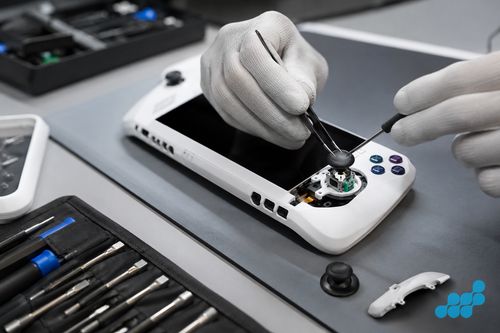
Drift — the stick registering movement when you are not touching it, or your character creeping across the screen — is the second most common ROG Ally fault, and it is almost always mechanical wear inside the analogue stick module rather than a software issue. The thumbstick module contains moving contacts that wear against each other over hundreds of hours of use, and once the worn surfaces no longer register a clean centre position, the device reads a permanent nudge. It is the same failure class that dogs every portable console with intensive analogue-stick use.
celltech replaces the worn stick module with an OEM-spec unit, then recalibrates the stick so the dead-zone and centre return to factory behaviour. The price is £39.95 for a single stick on the Z1, £44.95 on the Z1 Extreme and £49.95 on the Ally X, and the repair covers one stick per booking — if both are drifting, book it as two. Every stick replacement carries the 27-month guarantee. It is worth being precise: we describe and replace the worn analogue module rather than asserting a specific sensor technology for your model, because stick hardware can vary by revision and the correct fix is matched to what is actually in your unit.
Battery replacement
A tired ROG Ally battery shows itself the way every lithium cell does: shorter sessions, a percentage readout that falls off a cliff past 40 per cent, or a shell that no longer sits quite flat because the cell has begun to swell. The Ally X is the one to watch on swelling — it carries a substantially larger-capacity battery than the Z1 and Z1 Extreme to support longer play sessions, so there is more stored energy in a larger cell, and that is reflected both in the £124.95 price (versus £114.95 for the Z1 Extreme and £99.95 for the Z1) and in the safety procedure. We confirm the correct cell for your specific model rather than assuming a single shared part, because the capacities genuinely differ across the range.
A swollen battery is a safety matter, not just a capacity one. If your Ally's shell is bulging, the rear is hot to the touch, or the device no longer lies flat, stop using it and stop charging it, keep it cool and fire-safe, and do not attempt to flex or puncture the swollen area — a punctured lithium cell is a fire risk. Bring it to a specialist. We unseal the swollen cell with the correct technique, dispose of it through the proper channel, fit the new OEM-grade pack, and reset the battery controller so the device reports accurate capacity again. If the battery is visibly swollen, tell us before posting so we can advise on safe packing — a swollen cell needs gentler transit than a healthy one.
USB-C port (power + display output)
The ROG Ally's USB-C port is the most important connector on the device, and it does two jobs at once: it is how the Ally charges, and it is how the Ally outputs its display to a monitor, TV or the official XG Mobile external GPU dock. That dual role is why a worn or damaged USB-C port is so disruptive — a port that has gone intermittent does not just mean slow charging, it means the device stops working as a desktop PC too. Symptoms include a cable that wobbles or only charges at one angle, the external display flickering or dropping, and "charging" appearing and disappearing as the port makes and breaks contact.
celltech performs genuine board-level USB-C repair rather than the "not economical, buy a new one" verdict most shops give an Ally with a dead port. The work is microsoldering — the port is soldered to the main board, so a failed connector or torn pad is resolved at the component level rather than by swapping the whole board. That is the capability most UK repairers do not have, and it is what keeps an otherwise healthy Ally out of the bin. See our microsoldering explainer for what board-level work actually involves. Because the USB-C port is a connector rather than a mechanical component, it carries the 9-month connector tier — shorter than our 27-month screen tier because a connector is a wearing part subjected to daily plug cycles.
Fan and thermal issues
The ROG Ally runs a full Windows gaming load inside a handheld shell, which means it runs hot, and the small internal fan works hard to keep the APU in its thermal envelope. Two failures show up at the bench. The first is a fan that has failed mechanically — a dry bearing, a buzzing or grinding noise, or blades that no longer spin freely — which we resolve by replacing the fan unit (£49.95 on the Z1, £54.95 on the Z1 Extreme, £59.95 on the Ally X). The second is thermal: a device that throttles under load, gets unusually hot, or shuts down mid-session, which is usually dried-out thermal paste between the APU and the heatsink rather than a fan fault. We clean the old compound, apply fresh premium thermal paste, and load-test to confirm the temperatures are back in spec.
It is worth not confusing the two. A noisy fan is a fan replacement; a hot, throttling Ally with a quiet fan is a thermal-paste refresh. We diagnose which it is before quoting, so you pay for the actual fault rather than a guess. Both carry the 27-month guarantee because they are mechanical and consumable-part repairs, not connector or board work.
Triggers and SSD
The two remaining common repairs round out the menu. A trigger (L2/R2) that no longer registers, registers twice, or feels mechanically "floppy" is usually a worn trigger assembly — replaced at £39.95 on the Z1, £44.95 on the Z1 Extreme and £49.95 on the Ally X, with the 27-month guarantee. The SSD is the Ally's internal storage: a failing or full-to-bricking drive can be replaced and the larger capacity refitted at £44.95–£54.95 depending on model — useful both as a repair (a dead drive) and as an upgrade path (more room for a growing game library), though we always confirm the correct M.2 specification for your exact Ally before fitting.
What an ROG Ally repair actually involves
Every ROG Ally that arrives is opened the same way: the rear shell screws are removed in sequence, the rear cover is lifted to expose the densely packed interior, and the battery is disconnected first — always first — so no live power runs through the board while we work. From there the bench process follows the fault. A screen replacement means releasing the display ribbon cables from the main board, separating the bonded display assembly, seating the new full assembly, and reseating the ribbons under magnification before reassembly. A joystick replacement means desoldering or unclipping the worn stick module, fitting the OEM-spec replacement, and recalibrating the dead-zone in the device's calibration routine so the centre returns to true.
A battery replacement on a swollen Ally is the job owners most underestimate. The cell is unsealed from its housing with controlled, even pressure rather than leverage — the one thing you must never do is puncture a swollen lithium pack — then the connector is unclipped, the new pack seated, and the battery controller reset so the reported capacity is accurate rather than inherited from the old cell. The USB-C port is the board-level end of the work: the board is inspected under magnification, the failed connector or torn pad is identified, the connector is resoldered or the pad rebuilt, and the port is load-tested for both charging and display output before reassembly. Board-level work carries the 120-day tier.
After every repair, the Ally is function-tested end to end: display uniformity and touch across the full panel, stick and trigger registration through the full range of motion, a charge cycle to confirm the USB-C port delivers power, a thermal check under load where a fan or thermal-paste repair has been done, and a boot test to confirm Windows loads cleanly. Only when it passes does it go back in the box.
How we diagnose before you commit
An accurate diagnosis is what stops you paying for the wrong repair, so every Ally is bench-checked before any work is quoted. The process runs through the symptom: a "drifting" stick is checked against the calibration screen before we condemn the module, because a recalibration occasionally resolves a centre offset without a part swap; a "dead" USB-C port is tested with a known-good charger and cable before we condemn the connector; an Ally that "won't charge" might be a failed port, a swollen battery that has tripped its protection, or a board-level charging-IC fault — each a different repair at a different price. We tell you which one it actually is before you spend anything.
celltech vs Asus' own service
It is worth being direct about the alternative. Asus' own out-of-warranty route for the ROG Ally is oriented around its US service infrastructure, which makes UK owners wait, pay for international shipping, or simply give up; and an Asus depot's answer to a board-level fault is typically a whole-board swap rather than a component repair, which destroys the device's stored configuration and your installed game library along with it. There is nothing wrong with Asus' service for a device still inside its warranty — use it there — but for an out-of-warranty Ally the comparison is sharp.
celltech publishes the price first, repairs the component instead of the board where it makes sense (preserving your Windows install, your sign-ins and your game library), and underwrites standard screen, battery, joystick, fan, trigger and SSD work with a 27-month guarantee. The USB-C port carries the 9-month connector tier, and board-level and liquid work carries 120 days, matched honestly to the repair type rather than a blanket figure.
How celltech ROG Ally mail-in works
celltech is a UK-wide mail-in specialist — the service runs entirely by post, so you can be anywhere in the country. Book at /repair/gaming/handheld, then prepare the Ally for a safe journey: power it off fully, remove any MicroSD or expansion card, and pack it in bubble wrap inside a rigid outer box with a note carrying your booking reference — no loose accessories, docks or chargers unless we ask for them. Follow the completed order's inbound carriage and cover instructions, and declare it as a gaming handheld containing a lithium battery. If the battery is visibly swollen, tell us before posting so we can advise on safe packing for a swollen cell. We diagnose under the stated terms, confirm the exact price from the table, fit the OEM-grade part, test, and return it under the delivery terms shown for the order with your guarantee logged. See our gaming handheld repair by post guide for the full packing walkthrough.
The thumbsticks and trigger bumpers are protrusion points — pad around them so they cannot impact the screen.
Is a ROG Ally worth repairing?
Often, when the rest of the device is healthy. A joystick, battery or screen repair can cost materially less than replacing the handheld. Component repairs normally leave the existing SSD in place, but device failure and repair still carry data risk, so back up accessible data first. A board-level fault approaching the device's residual value may not be economical; we diagnose under the stated terms and explain the options before work proceeds.
Frequently asked questions
How much does it cost to repair a ROG Ally screen in the UK?
£149.95 for the Z1, £169.95 for the Z1 Extreme and £179.95 for the Ally X — the full bonded touchscreen assembly, fitted by post with the 27-month guarantee. The touchscreen digitiser is restored along with the display.
What is ROG Ally stick drift and how much does it cost to fix?
Drift is the analogue stick registering movement when untouched, caused by mechanical wear inside the stick module. celltech replaces the worn module with an OEM-spec unit and recalibrates it — £39.95 on the Z1, £44.95 on the Z1 Extreme, £49.95 on the Ally X, per stick, with 27 months.
Is the ROG Ally USB-C port repairable?
Yes — celltech performs board-level microsoldering on the USB-C port, which is both the charging input and the external display output. It is £69.95–£79.95 depending on model and carries the 9-month connector tier.
Does repairing a ROG Ally void any warranty?
Under UK consumer law, third-party repair does not automatically void a manufacturer's warranty; the manufacturer can only refuse if the third-party work caused the specific fault. In practice, if your Ally is still inside Asus' warranty, use Asus for covered repairs; for out-of-warranty devices, independent repair is the sensible route.
Can you send a ROG Ally by post for repair?
Yes — book at /repair/gaming/handheld, pack it in a rigid box with bubble wrap (remove any expansion card first), and post using suitable tracked postage arranged from the order instructions and select compensation cover appropriate for the device, declaring it as a lithium-battery device. Tell us in advance if the battery is swollen.
Is ROG Ally repair covered under a guarantee?
Yes. Screens, batteries, joysticks, fans, triggers and SSDs carry 27 months. The USB-C port carries the 9-month connector tier, and board-level microsoldering carries 120 days.
Is it worth repairing an ROG Ally or buying a new one?
Almost always worth repairing — a typical repair is a fraction of the replacement price, keeps your Windows install and game library intact, and carries the 27-month guarantee. The exception is a board-level fault near the device's value, which we diagnose under the stated terms and weigh honestly first.