ROG Ally Screen Replacement Cost UK 2026: Prices, Process & Guarantee
Direct answer: Check the current ROG Ally screen-replacement price for the exact model before booking. The repair replaces the bonded display and touchscreen assembly, with the applicable guarantee and return terms shown for the order. Service is UK-wide by post; customers follow the inbound carriage and cover instructions confirmed for the completed order.
A cracked ROG Ally screen is the most common reason one of these handhelds reaches the bench, and the cause is no mystery: the Ally is a 7-inch glass-fronted Windows machine that lives in a bag, gets passed between hands and rarely sits in a shell. One drop onto a corner, one knock against a door frame, and the IPS panel beneath the glass is gone — a spider of cracks, a dead stripe, or a touch layer firing phantom input across the broken zone. Beneath the glass the digitiser is fused to the display, so the full assembly is replaced in one operation, restoring both picture and touch. The exact UK price for all three ROG Ally variants is below. For the full ROG Ally repair menu, see the ROG Ally repair cost hub, and for the wider handheld picture our gaming handheld repair by post guide.
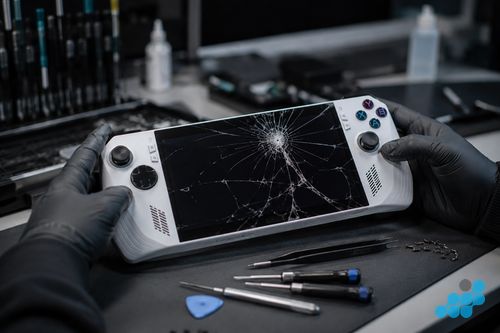
ROG Ally screen replacement prices 2026
The price is fitted, by post, including the OEM-grade bonded assembly, labour; return delivery follows the order terms. Every screen replacement carries the 27-month guarantee. If your exact variant is not listed, contact us for a quote.
| Model | Screen replacement |
|---|---|
| ROG Ally X | £179.95 |
| ROG Ally Z1 Extreme | £169.95 |
| ROG Ally Z1 | £149.95 |
Standard screen repairs include diagnostics. We confirm that the panel is the fault before quoting, because a "dead screen" can occasionally be caused by a loose display ribbon rather than a cracked panel.
What screen does the ROG Ally use?
Every current ROG Ally variant — the Z1, the Z1 Extreme and the Ally X — uses the same class of 7-inch 1080p IPS LCD touchscreen. There is no OLED option on the current ROG Ally line, which matters for two reasons. First, it is good news for repair cost: an IPS LCD assembly is meaningfully cheaper to source and fit than the OLED panels used on some rival handhelds, and that is reflected in the £149.95–£179.95 range here. Second, it means the touchscreen digitiser is fused directly to the LCD — the two layers behave as a single bonded assembly — so a screen replacement is always a full-assembly swap rather than a glass-only front replacement.
The small price steps between the Z1, Z1 Extreme and Ally X reflect differences in part sourcing and the surrounding assembly work for each chassis revision, not a different panel technology — all three deliver the same 1080p IPS touch experience after repair. It is worth noting that this IPS-versus-OLED distinction is part of why an ROG Ally screen costs a different amount to a Steam Deck OLED screen; our Steam Deck screen replacement page covers the comparison.
Common ROG Ally screen symptoms
- Cracked glass over the panel. The most obvious case — visible impact damage, usually radiating from a corner strike, with the LCD beneath showing bleed, dead stripes or total failure.
- Unresponsive or erratic touch. The display still shows an image but the touch layer registers phantom taps, dead zones, or drags that jump — typical when the digitiser is damaged but the LCD survives.
- Dead pixels or a dead stripe. A vertical or horizontal band that no longer renders, or a cluster of stuck pixels, pointing at LCD cell failure rather than impact damage.
- Backlight bleed or uneven brightness. Light leaking from the edges or a noticeably dim patch, often a sign of panel-edge damage after a knock.
- Black screen with sound. The Ally is running — you hear it — but the display is blank. This is the one to diagnose before condemning the panel, because it can be a loose display ribbon rather than a dead screen.
Full assembly versus glass-only
Some devices — older phones, certain tablets — allow a "glass-only" front replacement, where just the outer protective sheet is swapped and the display underneath is reused. The ROG Ally is not one of them. Because the IPS LCD and the touch digitiser are manufactured as a single fused assembly, the only correct, reliable repair is to replace that whole bonded unit. Anything marketed as a cheaper "glass-only" Ally fix is almost certainly separating fused layers that were never designed to come apart, which leaves a cloudy, badly-laminated screen prone to touch failure and dust ingress. celltech fits the full bonded assembly, and the result is a screen that behaves exactly as it did from the factory — crisp, evenly lit, and fully touch-responsive across the whole panel.
What the screen repair involves
The ROG Ally is a densely packed handheld, and opening one is a sequence job rather than a single pry. The rear shell screws are removed in order, the rear cover is lifted to expose the interior, and — critically — the battery is disconnected first so no live power runs through the board during the repair. The display assembly connects to the main board through short, fragile ribbon cables that are released under magnification; a torn ribbon here is the difference between a clean swap and a much bigger bill, which is why a shop that has never opened an Ally is a liability on this job. Once the ribbons are released, the bonded display assembly is lifted from the front frame, the new full assembly is seated, and the ribbons are reseated and checked.
Reassembly is the mirror image, with the rear shell screws torqued evenly and the chassis checked for correct seating. Then comes the function test: the display is checked for uniformity across the full panel, the touchscreen is verified across every zone (edges and corners included, where digitiser faults hide), the front buttons and sticks are confirmed unaffected, and a boot test confirms Windows loads cleanly on the repaired unit. Only when it passes does it go back in the box.
Genuine vs OEM-grade ROG Ally screens
We fit OEM-grade bonded assemblies that match the original panel specification for resolution, brightness, colour and touch responsiveness, and we tell you exactly what is going in before any work starts. Aftermarket Ally panels exist and they are cheaper, but they routinely trade away brightness uniformity and touch accuracy — the difference is most visible on a bright game with fast touch input, where a cheap substitute registers drags that skip or a display that looks washed-out next to the original. On a device whose entire appeal is a crisp, responsive 1080p panel, fitting a sub-grade screen is a false economy. See our parts-grade guide for the full breakdown.
How to send your ROG Ally for screen repair
Book at /repair/gaming/handheld, then pack the Ally for a safe journey: power it off fully, remove any MicroSD or expansion card, and cushion it in bubble wrap inside a rigid outer box — if the screen is already cracked, place a layer of packing between the glass and the bubble wrap so loose shards do not scuff the panel further. Include a note with your booking reference and the fault; no loose docks, chargers or accessories unless we ask for them. Follow the completed order's inbound carriage and cover instructions, and declare it as a gaming handheld containing a lithium battery. We diagnose under the stated terms, confirm the exact £149.95–£179.95 price from the table, fit the bonded assembly, test, and return it under the delivery terms shown for the order with your 27-month guarantee logged. See our gaming handheld repair by post guide for the full walkthrough.
Is ROG Ally screen repair worth it?
Almost always. A ROG Ally is a premium handheld — replacing one is a serious outlay — while a £149.95–£179.95 screen returns a usable machine for a fraction of that price, underwritten by the 27-month guarantee. Back up Windows, games and sign-ins first because no repair is risk-free. The screen is the part you stare at and touch for every session, so a cracked or dim panel turns a flagship handheld into a chore to use. The honest exception is a device with multiple major faults (a cracked screen plus a board-level issue), which we diagnose under the stated terms and weigh against the beyond-economical-repair threshold before you commit.
Frequently asked questions
How much does it cost to replace an ROG Ally screen in the UK?
£149.95 for the Z1, £169.95 for the Z1 Extreme and £179.95 for the Ally X — the full bonded IPS touchscreen assembly, fitted by post with diagnostics and the 27-month guarantee.
Is the ROG Ally screen the same on all models?
All three current models use the same class of 7-inch 1080p IPS LCD touchscreen — there is no OLED option on the current ROG Ally line. The small price steps between them reflect part sourcing and chassis differences, not a different panel technology.
Does screen replacement include the touchscreen digitiser?
Yes. The LCD and the touch digitiser are a single fused assembly on the ROG Ally, so the replacement restores both the display and full touch responsiveness across the whole panel.
Can I send my ROG Ally by post for screen repair?
Yes — book at /repair/gaming/handheld, pack it in a rigid padded box, and follow the completed order's inbound carriage and cover instructions. Diagnostic and return delivery follow the order terms.
What does the ROG Ally screen guarantee cover?
27 months on the screen assembly. It covers the fitted panel and digitiser against defect in the part or the work.
Does ROG Ally screen repair affect my game saves?
A screen replacement is a component swap on the display assembly, but no repair is risk-free. Back up Windows, installed games and save data before posting wherever possible.