Dyson Not Charging? Causes & Fixes (UK 2026)
Direct answer: A Dyson that will not charge has three main causes: a connection problem (the charger, dock, or dirty charge contacts), a thermal cut-out (a blocked filter or overheated motor has tripped the protection circuit), or a worn battery that no longer accepts charge. Most cases are resolved with a free fix; a persistent failure points to the battery or the charging board, both of which are repairable by post.
A Dyson that refuses to charge — or sits on the dock flashing blue — is a frequent and frustrating fault, and the good news is that most of the causes are free to diagnose and fix at home. This guide is an honest ladder: the quick checks first, then what the indicator light is telling you, then the battery and charging-board faults that need a repair. If you reach the end and it is hardware, our Dyson battery replacement and Dyson repair cost pages take it from there.
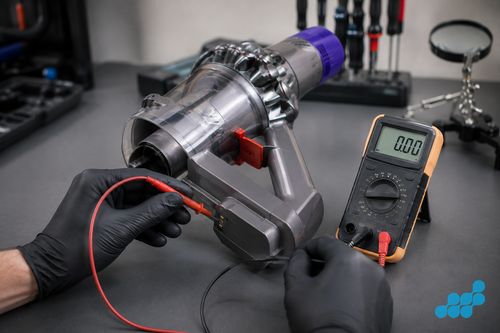
Quick checks first
Run through these before assuming the worst. They take a few minutes and clear the majority of charging faults.
- Check the wall socket and the charger. Plug something else into the same socket to confirm the socket works, and inspect the charger cable for damage. Try a different socket.
- Reseat the machine on the dock. A poorly seated machine makes no solid contact with the charge terminals. Remove it, inspect the dock contacts, and reseat it firmly.
- Clean the charge contacts. Dust and debris pack onto the dock and handle contacts over time. A dry cloth or cotton bud clears them and restores the connection.
- Reseat the filter. An unseated filter can trigger a protection cut-out. Remove, tap out the dust and refit it firmly so it clicks into place.
- Let it cool. If the machine has just cut out mid-use, the thermal protection may be active. Leave it to cool before trying to charge again.
- Try a compatible charger or dock if you have one. If a known-good dock brings it back to life, the fault was the charger or dock, not the machine.
What the flashing blue light means
A flashing indicator is Dyson's way of signalling a fault, and the pattern points to the area — broadly, a flashing light indicates a battery, temperature or charge-related issue rather than a healthy top-up. The exact number of flashes and what each pattern means varies by model, so rather than guess, check the indicator guide in your specific machine's manual or on Dyson's support site for your model. The reliable principle: a steady light while charging is normal; a persistent flashing pattern once the machine has cooled and the contacts are clean usually points to the battery or the charging board.
Overheating cut-out and blocked airflow
Dyson cordless machines have a thermal protection circuit. If the motor has overheated — very often because a clogged filter or blocked airflow path made it work too hard — the machine trips the protection and may refuse to charge or run until it has cooled and the blockage is cleared. Washing or replacing the filter and clearing the wand and cleaner head of debris is the fix; if it repeatedly overheats after a clean filter, the fault is deeper and worth a diagnosis.
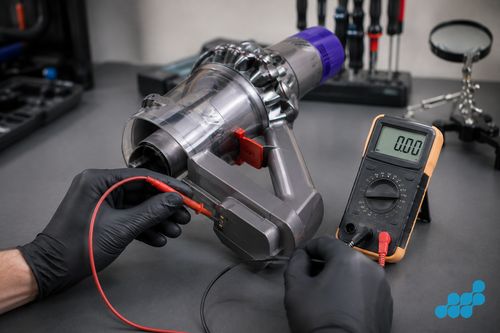
When it's the battery
If the machine is cool, the contacts are clean, the charger and dock test fine and it still will not hold charge — or it charges but dies in under a minute — the battery is the likely culprit. Aged cells either refuse to accept charge or collapse the moment a load is applied. A genuine-grade battery replacement fixes it, fitted and guaranteed. See our Dyson battery replacement cost page.
When it's the charging board / PCB
The third possibility is the charging board itself — the PCB that manages charge into the pack. If a known-good charger and a healthy battery both fail to bring the machine to life, the board is the suspect. This is board-level work (carrying a 120-day guarantee), not a battery swap, and it is fully repairable — see the Dyson repair cost hub.
Getting a charging fault repaired
celltech is a UK-wide mail-in specialist. Book your Dyson in, post it tracked and insured, and we diagnose the charging fault free before quoting the exact repair — whether that is a battery (27-month tier), a charging contact or connector (9-month tier) or the charging board (120-day tier). The general tracked-post process is in our mail-in repair guide. For other home and lifestyle tech, see our coffee machine repair and smart home device repair pages.
Reading the fault: connection, thermal, battery or board?
Most Dyson charging confusion comes from treating one cause as another. Each leaves a distinctive signature, and reading it correctly avoids a needless repair — or a needless replacement.
Connection faults — the known-good-dock test
Connection faults are the lowest-priced to fix and the easiest to confirm. If the machine springs back to life on a different socket or a known-good dock or charger, the fault is the accessory or the wall circuit, not the machine — no repair needed. If the contacts on the dock or handle are visibly dull or packed with dust, a dry-cloth or cotton-bud clean often restores the connection at once. The signature of a connection fault is that it is intermittent and position-dependent: the machine charges when seated one way and not another. Consistent failure across every dock, socket and seating position points deeper.
Thermal cut-out — the cooldown test
Dyson cordless machines protect themselves with a thermal cut-out, and it is a frequent cause of a sudden refusal to charge or run. The usual trigger is a clogged filter or blocked airflow path forcing the motor to overwork until it overheats, at which point the machine trips protection and sits dead until it cools. The test is simple: clear and reseat the filter, clear the wand and cleaner head of debris, and let the machine cool fully before retrying. If it charges again, the cause was thermal and the fix was free. If it repeatedly overheats even with a clean filter, the fault is deeper — a tired motor drawing too much current — and worth a diagnosis.
Battery versus charging board — the consistent-failure line
Once connection and thermal causes are ruled out, the fault narrows to the battery or the charging board, and the dividing line is the load test. A worn pack typically accepts a surface charge but collapses the moment a load is applied — the classic “charges but dies in under a minute” signature — and that points to the cells, resolved by a genuine-grade battery replacement at the 27-month tier. A machine that will not take charge at all even with a known-good charger, healthy contacts and a cool, clean filter points instead to the charging board (PCB), which is board-level work at the 120-day tier. Both are repairable — see the Dyson repair cost UK hub — and the free diagnostic confirms which before you commit.
Dyson not charging FAQ
Why is my Dyson cordless not charging at all?
The three usual causes are a connection problem (charger, dock or dirty contacts), a thermal cut-out from a blocked filter or overheated motor, or a worn battery. Work through the quick checks — socket, dock seat, contacts, filter, cooldown. If none work, it is likely the battery or charging board.
What does the flashing blue light on a Dyson mean — and how many flashes?
A flashing indicator signals a battery, temperature or charge fault rather than a normal charge. The exact flash count and its meaning vary by model, so check the indicator guide for your specific machine in its manual or on Dyson's support site. A persistent flash once the machine is cool and the contacts are clean usually points to the battery or charging board.
Can a blocked or unseated filter stop a Dyson from charging?
Yes. A blocked filter makes the motor overwork and overheat, which can trip the thermal protection and stop the machine charging or running. Remove, clear and reseat the filter, let the machine cool, then try again.
How do I tell if the problem is the battery or the charger?
Test a different socket and, if you have one, a known-good charger or dock. If the machine charges on the second setup, the fault is the charger or dock. If it still will not charge on known-good equipment, the battery or charging board is the likely cause.
My Dyson charges but the battery dies in under a minute — what's wrong?
That is the classic sign of worn cells that no longer hold capacity: the pack accepts a surface charge but collapses the moment a load is applied. A genuine-grade battery replacement fixes it. See our Dyson battery replacement page.
Can I use a different Dyson charger or dock as a test?
Yes — it is one of the most useful free diagnostic steps. If a compatible known-good dock or charger brings the machine back to life, the fault was the accessory, not the machine. If not, the fault is internal.
Is a Dyson charging-board fault repairable, or does the machine need replacing?
It is repairable. A faulty charging PCB is board-level work (carrying a 120-day guarantee) and does not mean the whole machine is scrap. We diagnose it free and quote the repair — see the Dyson repair cost hub.
How much does it cost to repair a Dyson that won't charge?
It depends on the cause: a battery replacement (27-month tier) is one figure, a charging contact or connector (9-month tier) another, and a charging-board repair (120-day tier) another. Because vacuum batteries are quote-based, we diagnose free and give you the exact price for your machine before any work starts — see battery and repair costs.