Kindle Battery Replacement Cost UK 2026: Paperwhite, Oasis & Scribe
Direct answer: Kindle battery replacement at celltech runs from £24.95 on a basic Kindle (2016) up to £69.95 on a Kindle Scribe (2024), with every Paperwhite and Oasis model priced individually in the table below. Replacing the cell on an ageing Paperwhite or Oasis is usually far cheaper than buying a new device and returns multi-week battery life for several more years. Every battery replacement carries our 27-month guarantee and is UK-wide tracked mail-in.
A Kindle that ran for weeks off a charge and now dies inside a day is almost always the same story underneath: a lithium-ion cell that has simply aged. The chemistry degrades steadily over hundreds of cycles, losing a little capacity each time until the device that lasted three weeks lasts three hours. The cell sits behind the e-ink panel as a small, glued rectangle, and it is replaceable — a fresh unit routinely returns a perfectly good Paperwhite or Oasis to its original multi-week stamina, often for less than a single new book costs. The exact per-model cost is below, alongside the signs that separate a tired cell from a faulty charger or port and what the bench involves. For the full Kindle price picture, see the Kindle repair cost hub.
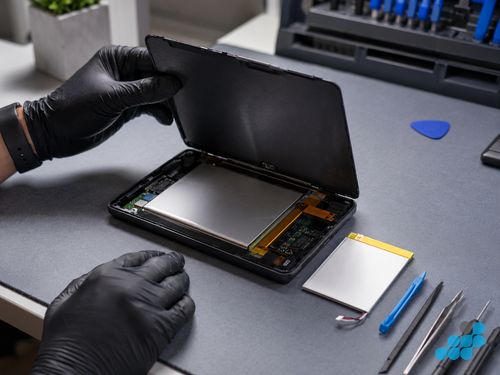
Kindle battery replacement prices by model
Prices below are fitted by post and include the OEM-grade cell, the labour and the insured return. Every battery replacement carries the 27-month guarantee. Diagnostics are free on standard repairs. If your exact Kindle variant is not listed, contact us for a quote.
| Model | Battery replacement | Charging port | Diagnostic |
|---|---|---|---|
| Kindle (2016) | £24.95 | £19.95 | £14.95 |
| Kindle (2019) | £29.95 | £24.95 | £14.95 |
| Kindle (2022) | £29.95 | £24.95 | £14.95 |
| Kindle (2024) | £34.95 | £29.95 | £14.95 |
| Paperwhite (2015) | £34.95 | £24.95 | £14.95 |
| Paperwhite (2018) | £39.95 | £29.95 | £19.95 |
| Paperwhite (2021) | £44.95 | £34.95 | £19.95 |
| Paperwhite Signature (2021) | £49.95 | £39.95 | £19.95 |
| Paperwhite (2024) | £49.95 | £39.95 | £19.95 |
| Paperwhite Signature (2024) | £54.95 | £44.95 | £19.95 |
| Oasis (2016) | £49.95 | £34.95 | £19.95 |
| Oasis (2017) | £54.95 | £39.95 | £24.95 |
| Oasis (2019) | £59.95 | £44.95 | £24.95 |
| Scribe (2022) | £64.95 | £44.95 | £24.95 |
| Scribe (2024) | £69.95 | £49.95 | £24.95 |
Signs your Kindle battery needs replacing
- Charging in hours, draining in hours. A healthy Kindle runs for weeks; a degraded cell drains in a day or two of normal reading despite showing a full charge.
- Never reaching 100%. The device stalls at 90-something percent or the reported percentage jumps around — the cell can no longer hold its full rated capacity.
- A bulging back cover. The rear of the device lifts or the screen raises slightly at an edge — the cell is swelling, which is a safety issue rather than ordinary wear.
- Won't power on even when plugged in. A cell driven below its safe cut-off voltage may refuse to accept charge at all until it is recovered on a known-good charger; if it stays dead, the cell is the likely culprit.
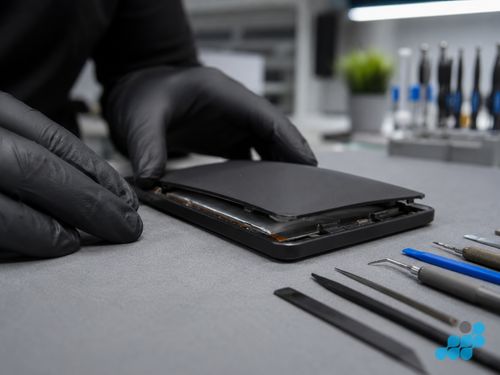
How long should a Kindle battery last?
A Kindle battery typically gives several years of normal reading before its degradation becomes obvious, because the e-ink display draws so little power that each charge cycle covers a long stretch of use. The figure that matters is charge cycles — the number of full discharge-and-recharge rounds the cell has been through — rather than calendar age, so a Kindle read heavily every day ages faster than one used occasionally. We keep any specific cycle-count claims general rather than citing a precise Kindle specification we cannot verify, because actual lifespan depends on charge habits, ambient temperature and how deeply the cell is discharged each time. The practical signal is simple: when weeks of life become days, the cell has reached the point where replacement makes sense.
Is it the battery or the charger?
Before booking a battery replacement, run the free triage that rules out the simpler causes. Try a different USB cable and a different charger — a frayed cable or a tired charger block is a frequent culprit that costs nothing to rule out. Inspect the charging port for pocket lint and debris, which can block the connector and mimic a dead battery. If the device charges slowly but reliably, the cell is more likely degrading than dead; if it refuses to charge at all no matter the cable, the port or the cell is at fault. Work through the full fault tree in our Kindle won't charge guide first, and if the battery is confirmed as the cause, the prices above apply.
What Kindle battery replacement involves
Kindle batteries are not the click-in, socketed cells you find in older laptops. They are bonded into the chassis with adhesive, which makes extraction the part of the job owners most underestimate. The Kindle is opened along its glued seam with a nylon spudger and controlled soft heat — the e-ink panel above the cell must never be flexed or heated unevenly. With the device open, the adhesive holding the cell is softened with isopropyl alcohol and the old battery is lifted out with a nylon tool, never a metal lever that could puncture the pouch. A swollen cell is handled with particular care: it is a safety item, lifted intact and immediately replaced before any reassembly begins.
The new OEM-grade cell is seated and connected, and where the model requires it the charge controller is reset so the device reports accurate capacity rather than inheriting the old cell's degraded calibration. The device is then load-tested through a full charge cycle and a discharge read to confirm the new cell holds its rated capacity, before the chassis is resealed and the device queued for return. This is the calibre of work that lets us underwrite the replacement with 27 months. We use the correct tools throughout — no heat-gun damage to the panel, no punctured cells — and we tell you exactly what is going in before any work starts.
Charging habits that extend a Kindle battery
A few simple habits slow the degradation that eventually sends every cell to replacement. Avoid running the Kindle fully flat before recharging — a cell ages faster when it is regularly driven to zero than when it is topped up from, say, twenty percent, because deep discharges are more chemically stressful than shallow ones. Keep the device out of a hot car or a sunlit windowsill while charging, as heat accelerates capacity loss more than any other factor. Use a quality charger and cable rather than a worn or cheap one, both because a tired charger under-delivers and stresses the cell and because the protection circuit works best with a clean, steady input. None of this stops the cell ageing — lithium-ion chemistry is what it is — but it does push the replacement point further down the road, and a Kindle treated this way typically outlasts one that is habitually drained to empty and left in the sun.
Send your Kindle in
Book at /repair/ereader/kindle, post your Kindle tracked and insured, and we diagnose free, confirm the exact battery price from the table above, fit the OEM-grade cell, load-test it, and return it tracked with the 27-month guarantee logged. Our how to pack your Kindle for posting guide covers the posting step line by line.
Is Kindle battery replacement worth it?
On a Paperwhite, Oasis or Scribe, yes — almost without exception. A £44.95 Paperwhite battery or a £69.95 Scribe battery is a fraction of the replacement device and returns multi-week battery life for several more years, with your library and highlights untouched. A fresh cell is often the single most cost-effective way to extend a Kindle's working life. On a basic Kindle (2016–2019) the calculation is closer, because a new basic Kindle is inexpensive; we diagnose free and weigh it honestly before you commit.
FAQ
How much does Kindle battery replacement cost in the UK?
From £24.95 on a basic Kindle (2016) to £69.95 on a Scribe (2024), with Paperwhite and Oasis between. Every model's price is in the table above, and every repair carries the 27-month guarantee.
How do I know if my Kindle battery needs replacing?
Weeks of life dropping to days, the device never reaching 100%, a bulging back cover, or a refusal to power on even when plugged in. Rule out a faulty cable and a packed port first; if those are fine, the cell is the likely cause.
How long will a new Kindle battery last?
Several years of normal reading before noticeable degradation, driven by charge cycles and usage habits rather than calendar age. The practical signal is the same: when weeks become days again, it is time.
Can a Kindle battery swell and damage the device?
Yes — a swelling cell lifts the back cover or pushes the screen out of its frame, and it is a safety issue rather than ordinary wear. Stop using the device, do not attempt to puncture or flex it, and send it in. We extract swollen cells intact as a matter of course.
Is it worth replacing a Kindle Paperwhite battery, or should I just buy a new Kindle?
Almost always worth replacing on a Paperwhite, Oasis or Scribe — the cell price is a fraction of a new device and returns multi-week life for years more. On a basic Kindle (2016–2019) the maths is closer; we diagnose free and weigh it honestly.
Is it safe to post a Kindle with a degraded battery?
Yes for a degraded-but-flat cell, posted switched off and well padded. A visibly swollen battery is a different matter — pack it carefully, avoid pressing the device, and post it promptly; our packing guide covers the specifics.