Amazon Kindle Repair Cost UK 2026: Screen, Battery & Charging Port
Direct answer: Kindle repair at celltech runs from £44.95 for a basic Kindle (2016) e-ink screen up to £139.95 for a Kindle Scribe (2024) display, with every Paperwhite, Oasis, Scribe and basic Kindle model priced individually in the table below. A replacement battery sits between £39.95 and £69.95, and a charging-port repair between £39.95 and £49.95. Screen and battery repairs carry a 27-month guarantee; charging-port and connector repairs carry the 9-month tier. Every Kindle is accepted UK-wide by post, with inbound carriage and cover instructions confirmed for the completed order. Your library, highlights and notes normally stay tied to your Amazon account, but back up or sync important content before repair because no repair is risk-free.
Amazon sells more e-readers in the UK than anyone else, and the Paperwhite in particular has become the default reading device in millions of households. What Amazon does not offer is a repair route for an out-of-warranty Kindle. Their standard answer is a discount code towards a new device — reasonable on a basic Kindle that costs little to begin with, but a poor outcome for a Paperwhite, Oasis or Scribe that holds years of annotations, highlights, downloaded dictionaries and a carefully curated library. That gap is exactly what this page fills. celltech is a UK-wide mail-in specialist that opens Kindles and component-repairs them, publishing the price for each listed model up front rather than behind a quote form, so you can decide whether a repair beats a replacement before you spend anything.
Every figure in this guide is drawn from our live price list and applied to the Kindle range specifically — Paperwhite, Oasis, Scribe and the basic Kindle line. The same e-reader price family covers Kobo, reMarkable and Onyx Boox devices, but those belong to our separate e-reader cluster and are not mixed in here. For the wider tablet-and-reader picture, our tablet screen repair guide covers the LCD/OLED side of the market.
Kindle repair prices 2026
Published prices cover the listed part and labour; return delivery follows the order terms. Covered screen, battery and button work uses the 27-month tier, and connector work 9 months. Diagnostic terms are shown for the booked repair. If your exact Kindle variant is not listed, contact us for a quote.
Basic Kindle & Paperwhite
| Model | Screen | Battery | Charging port | Button | Diagnostic |
|---|---|---|---|---|---|
| Kindle (2016) | £44.95 | £39.95 | £39.95 | £39.95 | £39.95 |
| Kindle (2019) | £49.95 | £39.95 | £39.95 | £39.95 | £39.95 |
| Kindle (2022) | £54.95 | £39.95 | £39.95 | £39.95 | £39.95 |
| Kindle (2024) | £59.95 | £39.95 | £39.95 | £39.95 | £39.95 |
| Paperwhite (2015) | £59.95 | £39.95 | £39.95 | £39.95 | £39.95 |
| Paperwhite (2018) | £69.95 | £39.95 | £39.95 | £39.95 | £39.95 |
| Paperwhite (2021) | £79.95 | £44.95 | £39.95 | £39.95 | £39.95 |
| Paperwhite Signature (2021) | £89.95 | £49.95 | £39.95 | £39.95 | £39.95 |
| Paperwhite (2024) | £89.95 | £49.95 | £39.95 | £39.95 | £39.95 |
| Paperwhite Signature (2024) | £99.95 | £54.95 | £44.95 | £39.95 | £39.95 |
Oasis & Scribe
| Model | Screen | Battery | Charging port | Button | Pen sensor | Diagnostic |
|---|---|---|---|---|---|---|
| Oasis (2016) | £89.95 | £49.95 | £39.95 | £39.95 | N/A | £39.95 |
| Oasis (2017) | £99.95 | £54.95 | £39.95 | £39.95 | N/A | £39.95 |
| Oasis (2019) | £109.95 | £59.95 | £44.95 | £39.95 | N/A | £39.95 |
| Scribe (2022) | £129.95 | £64.95 | £44.95 | £39.95 | £54.95 | £39.95 |
| Scribe (2024) | £139.95 | £69.95 | £49.95 | £39.95 | £59.95 | £39.95 |
A note on the table: these Kindle models are all monochrome e-ink panels, so the screen column uses the standard e-ink figure, not the colour-panel figure that applies to colour e-readers in the wider family. The Kindle Colorsoft is outside the scope of this cluster. For the focused breakdowns, see our Kindle screen replacement, Kindle battery replacement and Kindle won't charge pages.
Screen replacement
A Kindle screen does not behave like a phone screen when it fails. A cracked glass phone display shatters; a damaged e-ink panel shows a fixed black blotch, a frozen image, or one or more solid lines across the page — the electrophoretic layer behind the glass has fractured and the ink capsules have bled. That is the single most decisive Kindle fault, and the only fix is a panel replacement. The cost sits between £44.95 on a basic Kindle (2016) and £139.95 on a Scribe (2024), driven by the panel size and generation rather than anything exotic. Our Kindle screen replacement cost page walks through the symptoms, the e-ink-versus-LCD distinction, and exactly what the bench process involves.
Battery replacement
The second most common Kindle repair is a battery that no longer lasts. A healthy Paperwhite runs for weeks on a charge; a degraded one drains in a day or two, refuses to reach 100%, or — in rarer cases — swells and pushes the back cover out. Lithium-ion cells lose capacity steadily over hundreds of charge cycles, so a Kindle that has served three or four years of daily reading is a prime candidate. Replacement runs from £39.95 on a basic Kindle up to £69.95 on a Scribe, and routinely returns a perfectly good reader to multi-week battery life for a fraction of a new device. See our Kindle battery replacement cost page for the symptoms and the triage between a tired cell and a faulty charger.
Charging port & won't charge
The charging-port fault splits along the generational line in the Kindle range. Older basic Kindles and pre-2021 Paperwhites use a Micro-USB connector; the 2021 Paperwhite onwards, the 2022 basic Kindle and the Scribe line use USB-C. Either type can be affected by debris or a worn cable. A port repair runs from £39.95 to £49.95 and carries the 9-month connector tier. Before you book, work through the at-home checks in our Kindle won't charge guide; a dead cable or packed port can mimic a device fault.
What drives the repair price
- Model generation. A basic Kindle costs less to repair than a Paperwhite, which costs less than an Oasis or a Scribe. The newer and larger the device, the dearer the panel and cell — the Scribe's large note-taking display is the most expensive screen in the range.
- Fault type. A charging-port clean or repair is the most affordable fix; a battery is mid-range; an e-ink screen is the largest single part cost. Across the whole Kindle line, screen replacement is roughly two to three times the price of a battery swap on the same model.
- E-ink versus phone screens. Kindle panels are electrophoretic e-ink, not commodity LCD. They are lower-volume parts sourced per generation, which is why a Paperwhite screen costs what it does rather than the a budget phone LCD might — the comparison is not like-for-like.
- Connector tier. Charging-port and USB-connector repairs sit on the 9-month tier because the connector is the part most exposed to physical wear; screen, battery and button repairs sit on the 27-month tier. The guarantee follows the repair, not the device.
Repair versus Amazon's replacement route
It is worth being direct about the alternative. Out of warranty, Amazon's support route for a Kindle is typically a trade-in discount or a credit towards a new device rather than a repair of the unit you own. That is a reasonable offer on a basic Kindle where the replacement is inexpensive, and for some owners the upgrade is the right call. Where it falls down is the device that holds value Amazon's replacement does not capture: years of highlights and annotations, downloaded dictionaries, a paired audio setup, or simply a Paperwhite or Oasis that still has years of service left in it. celltech repairs the unit you already own, preserves everything tied to its hardware where possible, and underwrites the work with a tiered guarantee — 27 months on screens, batteries and buttons, 9 months on charging-port and connector work. We never use the word "most generous" or "lowest-priced"; we publish the figures and let them speak.
How the celltech mail-in service works
Kindles are compact, light and robustly built — among the easiest devices to post safely, which is why the entire Kindle service runs entirely by post. Book at /repair/ereader/kindle, follow the order instructions and use suitable tracked postage with compensation cover appropriate for its value, and we diagnose under the stated terms, confirm the exact price from the table above, fit the OEM-grade e-ink panel or cell, test the display and charge cycle, and return it under the delivery terms shown for the order with your guarantee logged. Our how mail-in repair works guide covers the mechanics end to end, and our how to pack your Kindle for posting guide covers the packing step line by line. The service runs entirely by post — you can be anywhere in the UK.
The e-ink glass is thin and brittle — a rigid box with screen-side foam is essential.
Genuine-grade versus aftermarket e-ink panels
We fit OEM-grade e-ink panels and cells matched to the original specification for contrast, resolution and capacity, and we tell you exactly what is going in before any work starts. Aftermarket e-ink panels are rare and generally poor — the contrast and ghosting behaviour of a cheap substitute is immediately visible on a reading device used for hours a day, which is the one context where a marginal panel is unacceptable. Aftermarket cells understate capacity and swell sooner, which is the last thing you want in a glued-shut Kindle. See our genuine vs OEM-grade parts guide for the parts-grade framework that applies across everything we repair.
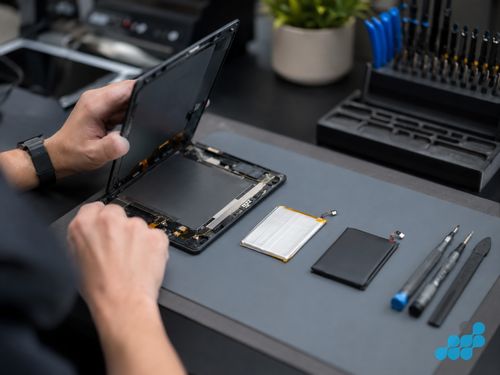
What a Kindle repair actually involves on the bench
The bench process for a Kindle is dictated by two things Amazon engineered in deliberately: a glued construction and a fragile e-ink panel. Opening a Kindle is not a screwdriver job. The front bezel or the rear housing is secured with adhesive, so the technician works the seam with a nylon spudger and controlled soft heat from a heating mat — never a heat gun, because the electrophoretic panel behind the glass is destroyed by uneven heat and must never be bent during removal. A heavy hand here cracks the panel that was still working. Once the device is open, the fault dictates the rest.
A screen replacement means disconnecting the fragile e-ink flex ribbon, lifting the bonded panel out of the frame without flexing it, seating the new OEM-grade panel flat, re-bonding the bezel evenly so there are no light leaks or pressure points, and running a full-refresh cycle to confirm every pixel drives correctly and there is no residual ghosting. A battery replacement means unclipping or, on most models, un-gluing the cell — Kindle batteries are bonded in place rather than socketed, so extraction is done with isopropyl to soften the adhesive and a nylon spudger to lift, never a metal lever that could puncture the cell. A swollen cell is handled with extra caution: it is a safety item, lifted intact and replaced before any reassembly. The new cell is seated, the charge controller is reset where the model requires it so the device reports accurate capacity, and the device is load-tested through a full charge and discharge read.
A charging-port repair on a Micro-USB Kindle is often a connector resolder or replacement on the board; on a USB-C model it can be a port clean, a connector replacement, or — where the port is board-mounted and a pad has lifted — a board-level resolder, which is why that work sits on the connector and board tiers rather than the 27-month tier. In every case the device is reassembled, the seam re-laid cleanly, and the screen, charge and button functions tested before it goes back. This is the calibre of work that lets us underwrite a screen or battery with 27 months.
Your library, highlights and notes
Purchased books and synced reading positions are generally tied to the Amazon account, while annotations, highlights and Scribe notebooks may also exist on the device. Sync or export everything you can before posting. We avoid resets unless they are necessary and agreed, but no repair should be treated as having zero data-loss risk.
Is it worth repairing your Kindle?
Compare the quoted repair cost with the current replacement price for your model. A newer Paperwhite, Oasis or Scribe may justify repair more readily than an older basic Kindle, but condition and intended use also matter. We confirm the applicable diagnostic terms and quote before work so you can make that comparison.
Frequently asked questions
How much does it cost to repair a Kindle screen in the UK?
From £44.95 on a basic Kindle (2016) up to £139.95 on a Kindle Scribe (2024), with Paperwhite and Oasis sitting between. Every model's screen price is in the table above, and every screen repair carries the 27-month guarantee.
Is it worth repairing an old Kindle Paperwhite?
Almost always. A Paperwhite screen (£59.95–£99.95) or battery (£39.95–£54.95) is a fraction of a new Paperwhite, and the device typically has years of service left. The exception is a basic Kindle (2016–2019), where a replacement can compete with the repair — we diagnose under the stated terms and weigh it honestly.
What is the difference between repairing a Kindle e-ink screen and a phone screen?
A phone screen is a backlit LCD or OLED that shatters; a Kindle screen is an electrophoretic e-ink panel that fails as a fixed black blotch, frozen image or solid line. E-ink panels are lower-volume, per-generation parts — not commodity LCDs — and must never be heated or bent during removal, which is why the bench process differs.
My Kindle won't charge — is it the port or the cable?
Work through the at-home checks in our Kindle won't charge guide first: swap the cable and charger, clean the port of debris, and try a forced restart. A dead cable or packed port can mimic a fault. If it still fails, the port repair runs £39.95–£49.95 on the 9-month connector tier.
Does celltech repair all Kindle models, including older ones?
Yes — the full range from the basic Kindle (2016) through every Paperwhite, Oasis and Scribe generation, plus the charging-port split between older Micro-USB and current USB-C models. If your exact variant is not in the table, contact us for a quote.
How do I send my Kindle in for repair by post?
Book at /repair/ereader/kindle, follow the completed-order instructions for inbound carriage, and we diagnose under the stated terms, confirm the exact price, fit the OEM-grade part, test, and return it under the order terms with the guarantee logged. Our packing guide covers the posting step line by line.
What warranty do I get on a celltech Kindle repair?
Screens, batteries and buttons carry the 27-month guarantee. Charging-port and USB-connector repairs carry the 9-month connector tier, matched to the repair type rather than a blanket figure.