Kindle Won't Charge or Turn On: Causes & Fixes (UK 2026)
Direct answer: A Kindle that won't charge or turn on is most commonly caused by a faulty USB cable, a blocked charging port, or a deeply discharged battery. Work through the triage steps below before sending it in — the cable swap alone resolves a significant number of cases. If the device is still unresponsive after thirty minutes on a known-good charger, the charging port, the battery or a board-level fault is the likely culprit, all of which celltech repairs by post. Charging-port and connector repairs carry the 9-month tier; battery and screen repairs carry 27 months.
A Kindle that will not wake or take a charge is common, and the reassuring truth is that most cases are not hardware failure at all — they are a dead cable, a port packed with pocket lint, or a battery driven below its safe cut-off that simply needs a long, patient charge to recover. The instinct is to assume the device is finished and start shopping; the right move is a short, ordered triage that costs nothing and clears the bulk of cases in five minutes. That triage is laid out in full below, with a clear line drawn at the point where the fault genuinely is the charging port, the battery or a board-level issue — and what each of those costs to put right. For the full Kindle price picture, see the Kindle repair cost hub.
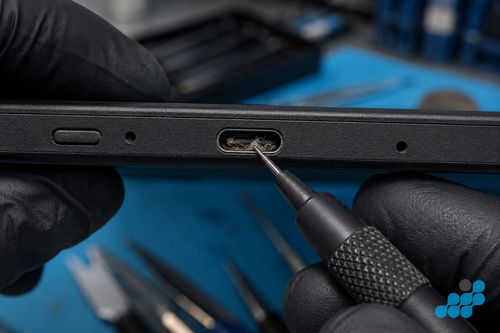
1. Try a different cable and charger
The first and simplest check, and the one that resolves more cases than any other. A frayed or kinked USB cable can carry enough current to wake the screen briefly but not enough to charge the cell, and a tired charger block can drop its output under load. Swap to a known-good cable and a known-good charger — ideally a genuine Amazon cable or a quality USB-C cable rated for data and power — and leave the Kindle on it for a full thirty minutes before judging. The Kindle range splits cleanly along its generational connector line here: older basic Kindles and the pre-2021 Paperwhites use Micro-USB, while the 2021 Paperwhite onwards, the 2022 basic Kindle and the entire Scribe line use USB-C, so make sure the replacement cable matches the port on your specific model. A surprising number of "dead" Kindles are simply a cable fault.
2. Check and clean the charging port
If a fresh cable and charger make no difference, the next suspect is the port itself. Shine a light into the connector and look for pocket lint, fluff or debris packed into the recess — particularly on a Kindle carried loose in a bag or pocket. Debris blocks the contacts and mimics a dead battery perfectly. Clean it out carefully with a dry wooden cocktail stick or a plastic dental flosser, never a metal pin or needle that could short the pins or score the connector. A bent or corroded pin, a connector that wobbles badly, or a port where the cable only makes contact when held at an angle are signs of physical port damage rather than simple dirt — and that is a repair rather than a clean. See our cross-brand charging port repair guide for the wider context.
3. Dead or deeply discharged battery
A lithium-ion cell driven below its safe cut-off voltage will refuse to accept charge from a brief plug-in — the protection circuit holds it back until it recovers enough to be safe. The fix is patience: leave the Kindle on a known-good charger for a full thirty minutes before concluding anything. If the charging indicator appears after ten or fifteen minutes and the device wakes, the cell was deeply discharged, not dead. If, however, the device is genuinely not holding charge over a day or two of normal reading, the cell has aged past useful capacity and needs replacing — see our Kindle battery replacement page. A visibly swollen back cover is a separate, safety-critical case: stop using the device and send it in.
4. Firmware crash or frozen state
Sometimes the Kindle is charged but the software has frozen, so it appears dead while the hardware is fine. A hard reset clears this. Hold the power button for a full forty seconds — timed, not estimated — ignoring any prompt that appears on screen, then release and wait for the device to reboot. On models with a sliding power switch, hold and slide and hold for the same forty-second count. For a completely unresponsive unit, the force-charge method — connecting to a known-good charger immediately after the forty-second hold — can rouse a device that refused both separately. If a hard reset brings the device back, the fault was a firmware freeze, not hardware.
5. Hardware fault — when to send it in
If a known-good cable and charger, a cleaned port, a thirty-minute recovery charge and a hard reset have all made no difference, the fault is genuinely hardware — and at that point the culprits narrow to three. The charging port or connector may be physically worn or damaged; the battery may have failed outright; or there may be a board-level power fault. Each is a different repair at a different price, and diagnosing which one it actually is happens on the bench, free, before any work is quoted. We never ask you to pay for the wrong repair.
How we diagnose before you commit
The at-home checks matter because "won't charge" is a symptom with several possible causes. When your Kindle arrives, we bench-check the symptom in order: a known-good cable and charger, inspection of the port for lint, bent pins or corrosion, a battery load test, and then the board-level charging path if needed. The diagnosis determines the repair — a packed port may only need cleaning, while a worn connector, tired cell or board-level fault requires different work. We confirm the diagnostic terms and quote before work begins.
The connector split across the Kindle range also shapes the diagnosis. Older basic Kindles and the pre-2021 Paperwhites use a Micro-USB port — more prone to physical wear and bent pins, and the more likely candidate for a connector repair. The 2021 Paperwhite onwards, the 2022 basic Kindle and the Scribe line use USB-C — more robust, but still vulnerable to lint packing and to damage from a forced, angled cable. Telling us your model on the booking lets us start the diagnosis on the right foot, but we confirm the actual cause on the bench regardless.
Repair costs for each fault
Two representative models show how the costs land. Take these as examples — every model's price is in the full table on the Kindle repair cost hub.
| Fault | Paperwhite (2024) | Kindle (2022) | Guarantee tier |
|---|---|---|---|
| Charging port | £39.95 | £39.95 | 9-month connector |
| Battery | £49.95 | £39.95 | 27-month |
| Screen (blank-screen case) | £89.95 | £54.95 | 27-month |
Diagnostics are free on standard repairs. The blank-screen row matters because a Kindle that appears completely dead can sometimes be a panel fault rather than a power fault — we separate the two on the bench before quoting. Note the tier split: a charging-port or connector repair carries the 9-month connector tier, matched to the part most exposed to physical wear, while a battery or screen repair carries the 27-month tier. The guarantee follows the repair, not the device.
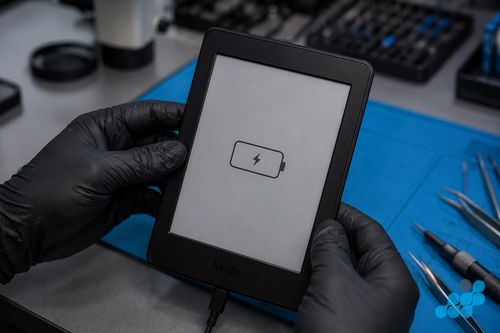
How to send your Kindle in
If the triage points to a hardware fault, book at /repair/ereader/kindle, follow the completed-order instructions for inbound carriage, and we diagnose under the stated terms, separate the port, battery and board-level causes on the bench, confirm the exact price, and carry out the right repair — no guesswork, no paying for the wrong part. Our how to pack your Kindle for posting guide covers the posting step line by line.
FAQ
Why won't my Kindle turn on even when plugged in?
Usually a faulty cable or charger, a blocked port, or a deeply discharged battery that needs thirty minutes on a known-good charger to recover. A firmware freeze is also possible — try a forty-second hard reset. If none of those work, the port, battery or a board-level fault is likely.
How do I hard reset a Kindle that won't respond?
Hold the power button for a full forty seconds (timed), ignoring any on-screen prompt, then release and wait for the reboot. On slider models, hold-slide-hold for the same count. For a fully unresponsive unit, connect to a known-good charger immediately after the hold.
How long should I charge a completely dead Kindle before it turns on?
A full thirty minutes on a known-good charger and cable before judging. A cell driven below its safe cut-off refuses a brief plug-in until it recovers — patience resolves more "dead" Kindles than any other step.
My Kindle charging port feels loose — does it need repairing?
A loose, wobbly connector, or one that only charges when the cable is held at an angle, is physical port wear rather than dirt — that is a repair, not a clean. Charging-port repairs run £39.95–£49.95 depending on model, on the 9-month connector tier.
Can a Kindle be fixed if the battery is completely dead?
Yes. A failed or deeply aged cell is replaced with an OEM-grade unit — from £39.95 on a basic Kindle to £69.95 on a Scribe — under the 27-month guarantee. See our Kindle battery replacement page.
Is it worth repairing an old Kindle that won't charge?
Usually yes on a Paperwhite, Oasis or Scribe — a port or battery repair is a fraction of a new device. On a basic Kindle (2016–2019) the maths is closer; we diagnose under the stated terms and weigh it honestly before you commit.