Inside Clean-Room Data Recovery: How We Rescue Dead Drives (UK)
A hard drive that clicks, grinds, or has simply stopped spinning carries a particular kind of dread — not because the drive itself is precious, but because what is on it might be irreplaceable. When a drive fails physically rather than logically, the recovery path is different, and the phrase you start seeing everywhere is "clean room." This page explains, plainly and honestly, what a clean room actually is, why some drives genuinely need one, what happens inside one, and — just as important — when a clean room is not needed at all.
We have written this to be useful whether you are deciding whether to trust a clean-room service with a failed drive, or simply trying to understand what the process involves and why it costs what it does. Throughout, we have been honest about the line between physical failures that demand a clean room and the many failures that do not — because the trust signal here is not promising everyone a clean room, it is telling you accurately whether you actually need one.
Direct answer: Clean-room data recovery means opening a failed hard drive inside a particulate-controlled environment so dust cannot land on the platters and cause further damage. It is needed for physical and mechanical failures — head crashes, seized motors, platter damage — but not for most logical or electronic faults. Inside, technicians swap failed parts using matched donor drives, image the platters, then rebuild the data.
What a clean room actually is
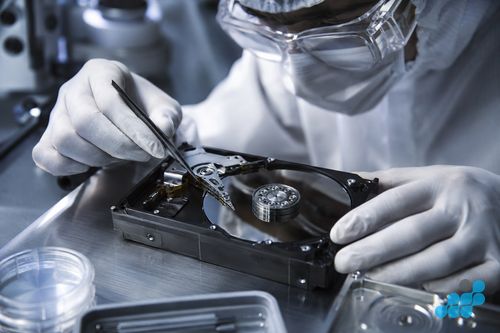
A clean room (or clean bench) is a controlled environment engineered to keep airborne particles — dust, skin flakes, fibres, pollen — to an extraordinarily low level, using high-efficiency particulate filtration and laminar airflow. Clean environments are classified by standards (commonly the ISO 14644 series) according to how many particles of a given size are permitted per cubic metre of air. The principle is simple: the air a hard drive is opened in must be vastly cleaner than ordinary room air, because the inside of a hard drive is engineered to tolerate almost none of it.
It is worth understanding why that matters, because it explains the whole discipline. A hard drive is not a sealed vacuum, as people sometimes assume; it has a filtered breather hole to equalise pressure, and its internal air is filtered by a tiny recirculating filter. But the tolerances inside are extreme: the read/write heads fly over the spinning platters at a height measured in nanometres — a small fraction of the thickness of a human hair, smaller than a particle of smoke. Anything that breaches that gap — a speck of dust, a fingerprint, a stray fibre — is enough to crash a head into a platter and destroy the very data you are trying to save. That is why opening a drive in ordinary air is so dangerous, and why a clean environment is non-negotiable for any work that exposes the platters.
Why some drives must be opened in one
The drives that demand a clean room are those with physical or mechanical failure — damage to the moving parts inside the sealed chamber. The classic symptoms are well known to anyone who has lived through one: a repeated clicking or knocking sound (the heads failing to find their parking position and striking the stop), a grinding or scraping noise (a head in contact with a platter), a drive that spins up and then spins down, or a drive that does not spin at all because the motor has seized.
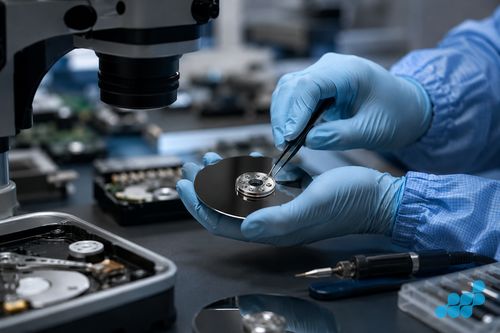
Behind those symptoms are a handful of physical failure modes. A head crash — the read/write heads making contact with the platter surface — can score the magnetic coating and physically destroy data in the affected tracks. A failed head stack means the heads cannot read or write at all, even though the platters may still hold perfect data. A seized spindle motor means the platters cannot turn. And platter damage — scratches, contamination, or a contaminant dragged across the surface — is the most serious, because it can make portions of the data permanently unrecoverable. Every one of these requires the drive to be opened, and every one requires that opening to happen in a clean environment.
When you need clean-room recovery — and when you don't
This is the section that most recovery firms under-explain, and it is where honesty matters most. Not every failed drive needs a clean room. In fact, most data loss does not involve physical platter damage at all, and treating it as if it does is how customers get overcharged.
You likely need clean-room recovery if:
- The drive makes clicking, knocking, grinding or beeping sounds.
- The drive is not recognised at all, or spins up and immediately spins down.
- The drive has suffered a physical impact (a dropped external drive, a laptop fall).
- You suspect a head crash, seized motor, or visible/audible mechanical failure.
You probably do not need clean-room recovery if:
- The drive is physically healthy but files are deleted, corrupted, or the file system is damaged — that is logical recovery, handled in software.
- The drive is not detected because of a failed external enclosure, cable, or USB/SATA bridge — often fixed by transplanting the bare drive into a healthy enclosure.
- The failure is on the drive's logic board (the green PCB on the underside) rather than inside the sealed chamber — a shorted TVS diode, a blown controller, or corrupted ROM. That is electronic/component-level recovery, and it does not require opening the sealed chamber at all.
This distinction is why diagnosis matters. A responsible bench listens to the drive, tests it, and tells you which category you are in before quoting a clean-room price. For the deeper component-level work on solid-state storage, see our companion guide on board-level data recovery and chip-off.
The clean-room recovery process
When a drive genuinely needs clean-room work, the process follows a disciplined sequence designed to maximise the chance of recovery while minimising further risk to the data.
- Diagnosis. The drive is assessed to confirm the physical failure mode — which component has failed, and whether the platters are damaged. This decides the recovery plan.
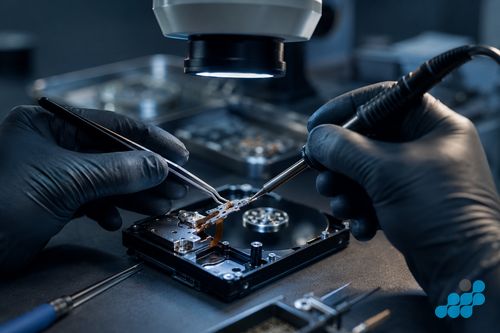
- Donor sourcing and matching. Failed parts cannot be replaced with any generic equivalent. A head stack, for example, must come from a donor drive matched closely to the failed one — same model, same firmware family, often same manufacturing site and date. Finding and validating the right donor is a significant part of the work.
- Part swap in the clean environment. Inside the clean room/bench, the failed head stack (or motor, or other component) is removed and the matched donor part is installed. This is the high-risk step: one speck of contamination, one clumsy movement, and the platters can be damaged beyond recovery.
- Imaging. Rather than reading files directly from the now-repaired drive, the entire platter surface is imaged — copied sector by sector to a healthy destination — using specialist tools that can retry, skip and work around bad areas. Imaging first means subsequent work happens on a copy, so the original is never stressed again.
- File-system rebuild. From the image, the file system is reconstructed — repairing corrupt tables, carving out orphaned files, validating integrity — and your data is delivered on healthy media.
Clean rooms and SSDs
A common point of confusion: do solid-state drives need clean-room recovery? For the vast majority of SSD failures, the answer is no. An SSD has no platters and no moving heads, so there is no sealed mechanical chamber to protect and no head crash to risk. When an SSD fails, the failure is almost always logical (controller firmware, firmware corruption, file-system damage) or electronic (a failed controller, a blown component, worn-out memory cells) — and the recovery path is logical work or board-level chip work, not clean-room platter surgery.
Where clean-room discipline can still apply to solid-state storage is the removal and reading of the memory chips themselves — the chip-off and board-level techniques covered in our board-level data recovery guide. That work benefits from a controlled environment and specialist tooling, but it is a different discipline from opening a mechanical hard drive. For what SSD recovery costs, see our SSD data recovery costs hub.
Why you should never open a failed drive yourself
It cannot be stressed enough: do not open a failed hard drive yourself, and do not let a non-specialist repairer do it. Opening the sealed chamber in ordinary room air lets airborne particles settle on the platters, and the first time the drive spins up those particles are dragged under the heads at high speed — turning a recoverable drive into a permanently destroyed one. The "just have a look inside" instinct is the single most common way a recoverable drive becomes unrecoverable.
The other common DIY mistake is repeated power cycling of a clicking drive. Each click is a head failing to park and striking the stop; each power cycle repeats that damage and risks a full head crash. If a drive is clicking, the right move is to stop, leave it powered down, and get it to a specialist — do not keep trying to coax it back to life.
How celltech handles clean-room cases
Every clean-room case begins with diagnosis: we assess the drive, listen to its behaviour, and confirm whether the failure is genuinely physical (needing the clean environment) or whether it is logical or electronic and recoverable more cheaply without one. We will not push a clean-room quote onto a drive that does not need it — honesty about the failure type is the differentiator, and it protects both your data and your wallet.
Where clean-room work is required, it is approached imaging-first, with closely matched donor parts and specialist tooling. We are transparent about how the work is delivered: clean-room recovery is a specialist discipline that may be carried out through a vetted partner facility rather than a facility we claim to own outright — we will not imply an in-house ISO clean room if the work is done with a trusted, audited partner, because implying capability we do not have would undermine exactly the trust this page is meant to build. Clean-room and hard-drive data-recovery work sits at the upper price tier (the most complex cases up to around £999, with typical physical recovery in the £149–£399 band) and carries a 120-day guarantee rather than the 27 months that applies to standard component repairs. Full pricing is on our hard-drive data recovery costs page and the broader data-recovery hub.
Clean-room cases are available through UK-wide postal booking. Customers arrange suitable tracked inbound postage using the order instructions, and all diagnostic, third-party, recovery and return charges are confirmed before work. For the related disciplines, see our board-level / chip-off and data recovery services pages.
What determines whether recovery succeeds
We will not give a fabricated success percentage, because the truth is that clean-room recovery outcomes depend almost entirely on the condition of the platters and the speed of the right intervention. The single biggest factor is whether the magnetic coating on the platters has been physically damaged. Where the heads have crashed and scored the surface, the data in those scored tracks is genuinely gone — no clean room, no donor drive, no specialist can recover data from a physically destroyed part of the platter. Where the platters are intact, on the other hand, the data is almost certainly still there, and a successful donor-head swap and imaging run has a strong chance of bringing it back.
The second factor is how the drive was treated after the failure. A drive that clicked once, was powered down, and sent straight to a specialist is in far better shape than one that was power-cycled dozens of times, run through diagnostics, or — worst of all — opened outside a clean environment. Every minute a failing drive runs is a minute of compounding damage. This is why the advice in this page keeps returning to the same point: if a drive is failing, stop using it, and get it to someone who will open it in the right place, if at all.
The third factor is the quality of the donor match. Head stacks are not interchangeable across models, firmware revisions, or sometimes even manufacturing batches; a poorly matched donor can refuse to read the platters or, worse, cause damage. A bench with a large donor library and the discipline to match carefully gives itself the best chance of a clean first-time swap. None of these factors are things a customer can control at the point of failure — but they are exactly what a responsible bench is paying for when it quotes a clean-room price, and they are why experience and discipline matter more than promises.
Choosing a clean-room recovery provider
Because clean-room work is high-stakes and opaque to most customers, it is the part of the industry where marketing tends to outrun honesty. A few clear signals separate a trustworthy provider from one that will cost you money and, worse, your data.
Look for a real diagnosis before a quote. A reputable bench examines the drive and tells you whether the failure is genuinely physical before quoting clean-room prices. Be wary of any firm that quotes the top-tier figure up front, before the drive has been assessed — that is the upsell pattern, and it is how logical failures that should cost a fraction end up billed at clean-room rates. Diagnosis is the standard you should expect.
Check the recovery-fee boundary. Clean-room recovery is inherently uncertain, so ask exactly which recovery, diagnostic, third-party and return-delivery charges apply if the agreed data is not recovered. Also ask how the provider safeguards the data once the drive is open and whether the clean environment is in-house or a vetted partner facility. For indicative clean-room pricing, see our hard-drive data recovery costs page.
Frequently Asked Questions
What is clean-room data recovery?
Opening a physically failed hard drive inside a particulate-controlled clean environment so dust cannot land on the platters and cause further damage. Failed parts are swapped using matched donor drives, the platters are imaged sector by sector, and the file system is rebuilt.
Do I need a clean room to recover my hard drive?
Only if the failure is physical or mechanical — clicking, grinding, a seized motor, a head crash, or damage from a drop. Most data loss is logical or electronic and does not need a clean room at all. A diagnosis confirms which category you are in.
Can you recover a clicking hard drive?
Often yes, but only if it is handled correctly. A clicking drive usually means a failing head stack, and each power cycle worsens the damage. Stop using it immediately and get it to a specialist — do not keep retrying it.
Why can't I open the drive myself?
Because ordinary room air contains particles that the drive's internal tolerances cannot survive. Opening the sealed chamber lets dust settle on the platters, and the first spin-up drags it under the heads at high speed — turning a recoverable drive into a permanently destroyed one.
Do SSDs need clean-room recovery?
Almost never. SSDs have no platters or moving heads, so there is no sealed mechanical chamber to protect. SSD failures are usually logical or electronic, and recovery is done in software or via board-level chip work — not clean-room platter surgery.
How much does clean-room recovery cost?
Clean-room work is priced after diagnosis according to the media, failure and required recovery route. Check the live service tiers and confirmed case-specific terms before proceeding; see our hard-drive data recovery costs page for context.
What is a donor drive?
A closely matched healthy drive of the same model, firmware family and (ideally) manufacturing batch, used as a source of replacement parts — typically a head stack or motor — for the failed drive. Matching the donor correctly is a major part of clean-room work.
Is the data still safe if recovery is attempted?
An imaging-first process copies readable data to healthy media as early as possible, reducing further work on the original drive. Diagnostic, recovery, third-party and return-delivery charges are confirmed before work; recovery itself is not guaranteed.