SSD Data Recovery Cost UK 2026: What It Costs to Get Files Off a Failed SSD
Direct answer: SSD data recovery is priced by the diagnosed failure, controller condition and NAND-level work required. Check current service tiers before booking. Celltech confirms diagnostic, recovery, third-party and return-delivery charges before work begins; recovery itself is not guaranteed.
Solid-state drives have largely replaced spinning hard drives inside modern laptops, and an entire generation of machines now has its photos, documents and work files living on NAND flash that the owner has never seen and cannot easily reach. The trade-off is rarely explained. A hard drive fails mechanically and usually gives warning; an SSD can fail abruptly and silently, sometimes taking everything with it, and the recovery rules are different — sometimes harder, sometimes easier — than the hard-drive playbook most people still have in their heads.
This guide is the hub for our data-recovery cluster. It sets out exactly what SSD recovery costs in the UK and why, explains the SSD-specific honesty almost no ranking page states (TRIM and controller encryption genuinely change the odds, and acting fast matters), and covers the full picture across the spokes: hard drive recovery, water-damaged phone recovery, RAID & NAS recovery, photo recovery from a broken phone and SD & memory card recovery. For the broad explainer, see our complete data recovery guide, and book through the data recovery service page.
SSD data recovery price guide
celltech’s published recovery tiers are taken straight from our live data recovery service page. We charge by the failure type, not a flat "data recovery fee", and every case starts with a diagnosis and an exact quote before any work begins. If we recover nothing, fees are confirmed before work.
| Failure type | What it means | Typical UK price | Success likelihood |
|---|---|---|---|
| Logical | Deleted, formatted or corrupted data on a drive that still powers on and reads | from £79 | High |
| Phone & laptop typical | Drive not detected, RAW / unallocated, firmware bricked, dropped NVMe, worn-out SSD | £149–£399 | Good, case-dependent |
| Physical / controller / chip-off | Failed controller, dead board, head-of-NAND damage, clean-room required | up to £999 | Case-dependent |
Check the live service page for current recovery tiers. The final price is confirmed after diagnosis because the required route may range from logical work to controller, clean-room or chip-level intervention. All diagnostic, recovery, third-party and return charges are confirmed before work.
What drives the cost of SSD recovery
- Failure type. A logical fault on a healthy drive is the lowest-priced tier; a dead controller or physical NAND damage is the most expensive. This is the single biggest cost driver.
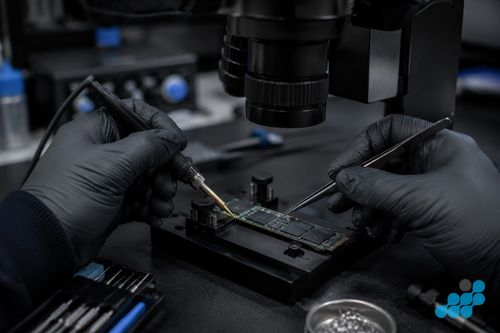
- Whether the controller still talks to the drive. If the SSD’s controller is alive, we can often read the NAND through it. If the controller has died, we are into chip-off territory — desoldering the NAND and reading it on a dedicated programmer.
- Encryption. Modern SSDs (and FileVault / BitLocker-encrypted drives) encrypt the NAND at the controller. If the controller is dead, the chip-off read has to deal with that encryption — which needs your credentials or recovery key. It is recoverable, but it is more work.
- Single drive vs RAID-of-NAND. Some high-capacity SSDs stripe data across multiple NAND packages internally. Recovering those is effectively a mini-RAID reconstruction and sits at the top of the range.
- Drive size and time. Larger drives and full-drive imaging take longer, which is reflected in the quote.
Why SSDs fail differently to hard drives
A hard drive is mechanical — spinning platters and a read/write head on an arm. Its failures are physical and often audible: the click of death, a seized motor, a head crash. An SSD has no moving parts, so it never clicks, never seizes and never suffers a head crash. Instead it fails electronically or logically: a controller IC dies, a firmware bug bricks the drive, a power surge damages the PCB, or the NAND simply wears out after too many write cycles.
The crucial thing to understand is that a dead controller does not mean dead data. The NAND chips where your files actually live are often perfectly intact even when the SSD will not mount, will not show up in Disk Management, or reports the wrong capacity. In those cases the recovery path is to bypass the failed controller and read the NAND directly — either through a donor-controller board swap or, at the top end, by desoldering the NAND for a chip-off read. This is the same competence that powers our board-level device work; see our clean-room recovery and chip-off recovery explainers.
Common SSD failure modes we recover from
- Not detected. The drive no longer appears in BIOS, Disk Management or Finder. Often a dead controller or a blown component on the PCB.
- RAW / unallocated. The drive appears but the file system is gone, showing as RAW or asking to be formatted. Usually a corrupted partition table or file system — do not format it.
- Bricked firmware. The SSD’s firmware has crashed and the drive locks itself — a known failure mode on certain controller families. Recoverable through firmware repair tools.
- Power surge. A surge or wrong charger has damaged the drive’s power circuitry. The NAND often survives; the board does not.
- Dropped NVMe / M.2. A laptop is dropped and the small M.2 drive is damaged or its connector torn. Physical, but frequently recoverable.
- Wear-out. The NAND has exhausted its write cycles and the drive has gone read-only or dropped capacity.
External and portable SSDs — the USB and Thunderbolt drives people use for backups — add one more common failure mode worth knowing about: the bridge board. An external SSD is really a standard internal SSD mounted on a small bridge board that translates between the drive’s native interface (SATA or NVMe) and the USB / Thunderbolt cable. Very often the SSD itself is perfectly healthy, but the bridge board or the USB connector has failed — damaged by a knock, a surge, or simple connector wear — so the drive appears dead. In those cases the recovery is to bypass the bridge board and read the healthy internal SSD directly, which is one of the more affordable physical recoveries. So before assuming an external SSD has lost its data, get it diagnosed: a “dead” portable drive is frequently just a dead enclosure.
Why acting fast matters more with SSDs
This is the SSD-specific honesty that almost no recovery-firm landing page states, and it genuinely changes your odds. Modern operating systems use a feature called TRIM to keep SSDs fast: when you delete a file, TRIM tells the drive’s controller to wipe those NAND blocks in the background, because flash has to erase before it can write. Combined with background garbage collection, that means deleted files on a healthy, powered-on SSD can disappear far faster than they would on a hard drive — sometimes within minutes.
The practical takeaway: if you have accidentally deleted files or formatted an SSD, stop using the drive immediately. Do not boot from it, do not install recovery software onto it, do not keep working. Power it off and send it in. Every minute the drive is running is a minute TRIM and garbage collection are potentially erasing the very blocks your deleted files still occupy. On a drive that has already failed and will not mount, this is less of a concern (it is not running TRIM), but the rule still holds: do not keep retrying it. Repeated power cycles on a failing controller generate heat and voltage swings that can push a recoverable fault past the point of return. For MacBook-specific recovery, see our MacBook data recovery guide.
How celltech SSD recovery by post works
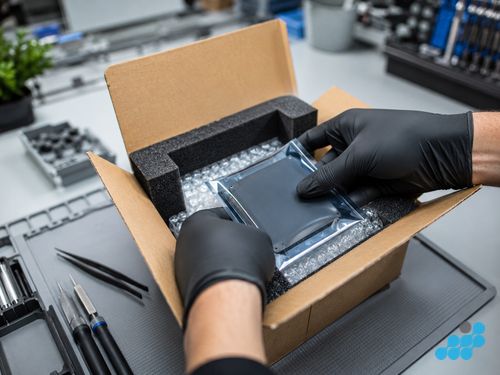
celltech is a UK-wide postal specialist and accepts devices by post only. Book through the data recovery page, then follow the order-specific packing and shipping instructions. Customers arrange suitable tracked inbound postage with appropriate cover. We diagnose under the stated terms and confirm the recovery scope and exact quote before work.

Other data recovery we handle
SSD recovery is one spoke of a wider capability. We recover data across every common failure and device class:
- Hard drive recovery — clicking, dead and failed HDDs, head crashes, seized motors, bad PCBs.
- Water-damaged phone recovery — photos and messages off a drowned or corroded phone that will not turn on.
- RAID & NAS recovery — failed Synology / QNAP arrays and degraded multi-disk volumes.
- Photo recovery from a broken phone — smashed screen, dead battery, phone that will not switch on.
- SD & memory card recovery — corrupted, snapped and "needs formatting" cards from cameras, drones and phones.
For the wider recovery routes, limitations and service terms, see our complete data-recovery guide.
The guarantee, honestly framed
Data recovery itself carries no guarantee on the outcome because some failures are unrecoverable. Diagnostic terms, recovery scope, exact quote and all potential charges are confirmed before work. Where qualifying board-level, corrosion, controller or chip-off repair work is performed, that repair work carries the stated 120-day guarantee; it does not guarantee that data can be recovered.
Is SSD data recovery worth it?
That depends on the value of the data, the diagnostic findings, recovery prospects and confirmed cost. If the drive contains only replaceable software and your files are backed up elsewhere, recovery may not be worthwhile; if it contains the only copy of irreplaceable data, the same evidence helps you decide whether an attempt is proportionate.
SSD data recovery FAQs
How much does it cost to recover data from a dead SSD in the UK?
Check the live service tiers for current pricing. The diagnostic terms, likely recovery route and exact quote are confirmed before work begins.
Can you recover data from an SSD that is not detected or recognised?
Often, yes. A drive that is not detected has usually lost its controller or a board component, not its NAND. We bypass the failed controller via a donor board or chip-off read of the NAND itself.
Is SSD data recovery harder than hard drive recovery?
Different, not uniformly harder. SSDs avoid mechanical failures entirely, but TRIM and controller encryption can make recovering deleted files from a running SSD harder than from a hard drive. Acting fast — powering off the drive — materially improves the odds.
Will TRIM mean my deleted files are gone forever?
Not necessarily, but it makes speed critical. TRIM and background garbage collection can erase deleted blocks quickly on a powered-on SSD, so stop using the drive immediately and send it in. The sooner it is powered off, the better the odds.
Can you recover from an encrypted or BitLocker / FileVault SSD?
Yes, provided you have the password, recovery key or credentials. The NAND is recoverable through chip-off; the encryption is then decrypted with your key. Without the key, encrypted data cannot be recovered.
Do I pay if you cannot recover anything?
Recovery is not guaranteed. Diagnostic, recovery, third-party and return-delivery charges, including any outcome-based terms, are confirmed before work begins.
How do I send my SSD or laptop in safely?
A bare SSD goes in an anti-static bag inside a rigid padded box. An SSD inside a laptop can stay in the machine, so pack the whole laptop securely. Book through the data recovery page, then follow the inbound carriage and cover instructions confirmed for the completed order.
Can you recover from a failed NVMe / M.2 drive?
Yes. NVMe and M.2 drives, including those damaged by a dropped laptop or a torn connector, are within our standard recovery scope — often through chip-off of the NAND packages.