SD & Memory Card Data Recovery Cost UK 2026: Cameras, Drones & Phones
Direct answer: SD and memory-card recovery is priced by the diagnosed fault and required route. If the card asks to be formatted, stop using it and do not format it. Check current service tiers, then review the confirmed diagnostic, recovery, third-party and return-delivery charges before work. Recovery itself is not guaranteed.
A memory card is the smallest, lowest-priced and most easily lost storage medium most people own — and disproportionately, it holds the irreplaceable stuff: a wedding shoot on a photographer’s SD card, holiday drone footage, the only copy of a baby’s first photos on a microSD. So when a card corrupts, snaps, or greets you with the dreaded "the card needs to be formatted" prompt, the instinct to click OK is exactly wrong, and the difference between a £79 recovery and a lost shoot is usually what you do in the next thirty seconds.
This page covers what SD and memory card recovery costs in the UK, the truth about "needs formatting" prompts, the difference between a logical and a physical card failure, and how to avoid losing a card in the first place. It is the SD-card spoke of our data recovery hub, sibling to photo recovery from a broken phone and hard drive recovery. Book through the data recovery page.
“Card needs formatting”? Do not — here is why
The single most important thing to know about a corrupt memory card: a "needs formatting" or "card not formatted" prompt almost always means a corrupt file system, not erased photos. The card’s controller can no longer make sense of the index that points to your files, so the camera or computer helpfully offers to wipe and rebuild it — but the actual photo data is still sitting in the flash memory, intact and recoverable, until something overwrites it.
If you click "format", you erase that index and start overwriting the data. If you keep shooting on the card after the error, the camera writes new photos over the old ones. Either way, you turn a high-success logical recovery into a partial one — or worse. The correct action is the opposite of what the prompt suggests: eject the card, do not format it, do not keep shooting, and send it in. A logical recovery from a card in this state has a high success rate.
SD & memory card recovery price guide
Our recovery tiers are published on the live data recovery page and charged by failure type. The diagnostic terms, recovery scope, potential charges and exact quote are confirmed before work begins.
| Failure type | Symptoms | Typical UK price | Chip-off needed? |
|---|---|---|---|
| Logical | "Needs formatting", corruption, accidental deletion; card still reads | from £79 | No |
| Controller / firmware | Card not recognised at all; wrong capacity shown; read errors | £149–£399 | Sometimes |
| Physical / snapped | Broken card, cracked monolith, bent pins, dead controller | £299–£599+ | Yes |
The published bands are £79–£149 for logical work, £149–£299 for typical recovery, and £299–£599 rising toward up to £999 for the most complex cases. The exact figure is always confirmed after the diagnosis.
Logical vs physical card failure
Memory card failures fall into two broad camps, and the camp decides the price. A logical failure — corruption, accidental deletion, a formatting prompt, a damaged file system — leaves the flash memory itself healthy. Recovery is software-level: we read the raw flash, reconstruct the file system, and pull the intact files back out. This is the most affordable tier and has a high success rate, especially if the card has not been written to since the failure.
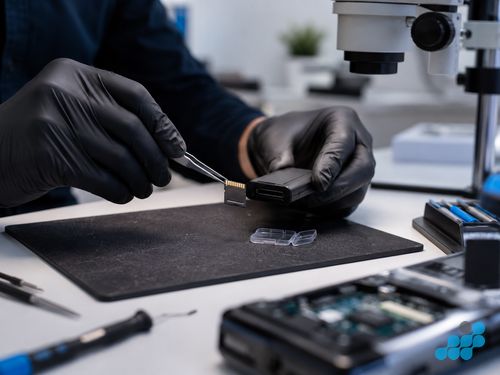
A physical failure is different. A snapped card, a cracked monolithic microSD, bent connector pins, or a dead controller chip means the card can no longer be read through its normal interface at all — so we go around it. Modern microSD cards are monolithic (the controller and NAND are built into a single package, with no separate chips), which makes physical recovery genuinely specialist: the card has to be carefully prepped and the flash read directly through a chip-off process. That is the top-tier work, priced higher, and it is the competence that separates a real recovery lab from a shop running off-the-shelf software. See our chip-off recovery explainer for the detail.
SD, microSD, CF, CFexpress — what we recover
- SD and SDHC / SDXC. The standard camera card. Logical failures are common and affordable; snapped or controller-dead cards need chip-off.
- microSD. The phone, drone and action-cam card, and the most physically fragile because of its monolithic construction. Snapped microSDs are recoverable through monolithic chip-off.
- CompactFlash (CF). Older pro camera cards. Controller and PCB failures are recoverable; pin damage is common.
- CFexpress and XQD. The modern high-speed pro cards used in mirrorless cameras and cinema bodies. High capacity, high value footage — logical and controller recoveries are well within scope.
Where these cards live also points to related clusters: a GoPro or drone card often fails alongside water or impact damage, so see our GoPro water damage resource alongside card recovery. The principle is always the same — stop using the card, and recover before you overwrite.
The device the card was in also tells us a lot about the failure before we even look at the card. A card pulled from a camera that simply stopped reading mid-shoot is most likely a logical failure — recoverable in the affordable tier. A card from a drone that crashed, or a GoPro that took an impact while recording, may have suffered a write interruption that left the file system half-finished — still usually a logical recovery, but the last clip being written is sometimes truncated. A card that has been physically snapped — sat on in a pocket, caught in a door — is the physical tier, and we assess the break under magnification before deciding whether a monolithic chip-off read is possible. Matching the failure story to the card on the bench is the first step of the diagnosis, and it usually narrows the likely tier before we have even plugged the card in.
Avoiding card loss next time
Card recovery is recoverable; prevention is better. A few habits dramatically reduce the chance of losing a card’s contents:
- Eject before removing. Pulling a card while the camera or phone is writing — or while the computer is still caching — is a leading cause of file-system corruption. Power down or eject first.
- Never fill a card to 100%. The last few percent of a card is where the controller is juggling wear-levelling and is most prone to corruption. Offload and format in-camera when a card is near full.
- Format in the camera, not the computer. Formatting in the device that will write to the card ensures a compatible file system; computer-formatted cards occasionally confuse cameras.
- Replace ageing cards. Flash wears out. A card that has been through years of heavy use is more likely to fail — retire important shoot cards before they retire themselves.
- Offload immediately after a shoot. Do not let a card become the long-term home of the only copy. Two copies, two places.
Sending a card in
Follow the order-specific packing instructions; a snapped or fragile card needs a small rigid container inside suitable outer packaging. Customers arrange suitable tracked inbound postage with appropriate cover. We diagnose under the stated terms and confirm the quote before recovery work. Qualifying chip-off or controller repair work carries the stated 120-day guarantee; the recovery outcome itself is not guaranteed.
FAQs
How much does SD card data recovery cost in the UK?
Check the live service tiers for current pricing. The diagnostic terms, likely recovery route and exact quote are confirmed before work begins.
My card says "needs formatting” — are my photos lost?
Almost certainly not. A formatting prompt usually means a corrupt file system, not erased photos — the data is still there. Do not format the card and do not keep shooting on it; send it in for a logical recovery.
Can you recover photos from a snapped or broken SD card?
Yes, through chip-off recovery. Modern microSD cards are monolithic, so physical recovery means reading the flash directly — specialist work, but usually possible.
Can you recover deleted photos from a memory card?
Usually yes, provided nothing has been written to the card since deletion. Stop using the card immediately and send it in — a logical recovery has a high success rate.
Do you recover microSD from phones and drones, and CFexpress from cameras?
Yes — SD, SDHC / SDXC, microSD, CompactFlash, CFexpress and XQD are all within scope, from phones, drones, action cameras and pro bodies alike.
Should I keep using the card after losing photos?
No. Writing new data to the card overwrites the recoverable photos. Stop using it immediately, eject it, and send it in.
What if recovery fails?
Recovery is not guaranteed. Diagnostic, recovery, third-party and return-delivery charges, including any outcome-based terms, are confirmed before work begins.
How do I send a memory card in?
Put a fragile or snapped card in a small rigid container inside a padded envelope, then follow the completed-order carriage instructions. Book through the data recovery page.