GoPro Screen Replacement Cost UK 2026: Rear & Front Touchscreen
Direct answer: GoPro screen replacement at celltech runs from £44.95 for a Hero 7 White rear screen up to £89.95 for a Hero 13 Black rear screen. The generations that carry a front colour display are priced separately — from £39.95 to £59.95. Every screen repair is a full bonded-assembly swap that restores both display and touch, fitted through our UK-wide postal service with the 27-month guarantee; inbound and return carriage follow the terms confirmed for the order.
A GoPro lives face-first in the world — helmet, handlebar, chest harness — so a cracked or dead touchscreen is one of the most common reasons one reaches our bench. Lose the rear screen and you cannot frame a shot, review a clip or change a setting without fumbling; lose the front display on the vlogging generations and half the reason you bought the camera goes with it. Both screens are adhesive-bonded assemblies swapped as a unit, not glass-only repairs. The exact UK price for both, across every Hero model, is below, with the rear touchscreen distinguished from the front display and what the repair restores made plain. For the full GoPro repair menu, see the GoPro repair cost hub.
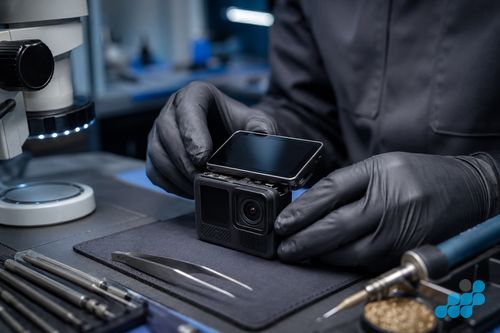
GoPro screen replacement prices by model
Prices are fitted, by post, including the OEM-grade bonded assembly, labour; return delivery follows the order terms. Every screen repair carries the 27-month guarantee. The Hero 11 Black Mini has no displays at all and is omitted; the older models that lack a front colour display show N/A in that column. If your exact model is not listed, contact us for a quote.
| Model | Rear screen | Front display |
|---|---|---|
| Hero 13 Black | £89.95 | £59.95 |
| Hero 12 Black | £84.95 | £54.95 |
| Hero 11 Black | £79.95 | £49.95 |
| Hero 10 Black | £74.95 | £44.95 |
| Hero 9 Black | £69.95 | £39.95 |
| Hero 8 Black | £64.95 | £44.95 |
| Hero 7 Black | £59.95 | N/A |
| Hero 7 Silver | £49.95 | N/A |
| Hero 7 White | £44.95 | N/A |
| Hero 6 Black | £54.95 | N/A |
| Hero 5 Black | £49.95 | N/A |
Diagnostics are included on standard screen repairs. We confirm whether the display assembly or another fault is responsible before quoting.
Rear touchscreen vs front display
A GoPro carries two distinct displays, and it helps to know which one you have actually broken. The rear touchscreen is the larger display on the back of the camera — the one you tap to set modes, frame shots and play back clips. It is present on every model in the table, and it is the screen most commonly cracked in a drop because it faces outward when the camera is mounted. The front display is the smaller screen on the front, beside the lens, used to frame yourself for vlogs and selfie shots. The more recent Hero generations carry a front colour display, and on those models it is a separate part with its own price — breaking it does not mean replacing the rear screen, and vice versa.
Rather than assert a hard generation cutoff for the front display, the table above shows exactly which models carry one and what each costs — that is the authoritative answer for your specific camera. If your model shows N/A in the front column, it does not have a front display and only the rear screen is in play.
Common GoPro screen symptoms
- Cracked rear glass over the display. Visible impact damage, usually with dead touch or bleed underneath — the classic drop fault.
- Unresponsive or erratic touch. The image still shows but taps register in the wrong place, or not at all — a damaged digitiser layer.
- Blank rear screen with the camera still recording. The camera powers on, the record light fires, but the screen stays black — worth diagnosing before condemning the panel, as it can be a loose ribbon.
- Dead or flickering front display. The front screen is dark, flickers, or shows artefacts while the rear screen works normally — an isolated front-display fault.
- Backlight bleed or dim patches. Uneven brightness or light leaking from the edges, typically after a knock to the display assembly.
What happens during a GoPro screen repair?
A GoPro screen is an adhesive-bonded assembly, not a clip-in panel. The camera is opened, the affected display assembly is released from the fascia, and its ribbon cable is detached from the board under magnification. The matched assembly is then seated, the ribbon checked, and fresh sealing adhesive fitted where required. Opening the camera can compromise its original water resistance, which an independent repair cannot guarantee.
The function test is the last step and it is thorough: the display is checked for uniform brightness and correct colour, the touch layer is verified across the full panel (corners and edges included, where faults hide), the front display — where fitted — is confirmed working, and the camera is power-cycled and recording-tested to confirm the repair has not disturbed anything else. Only when it passes does it go back in the box.
Genuine vs OEM-grade GoPro screens
We fit OEM-grade bonded assemblies matched to the original specification for resolution, brightness, colour accuracy and touch responsiveness, and we tell you exactly what is going in before any work starts. Aftermarket GoPro screens exist and they are cheaper, but they routinely trade away brightness and colour accuracy — the difference is most visible outdoors in bright light, where a sub-grade screen washes out and becomes hard to read for framing. On a device whose screen is your only viewfinder, a dim or inaccurate panel is a real problem, not a cosmetic one. See our genuine vs OEM-grade parts guide.
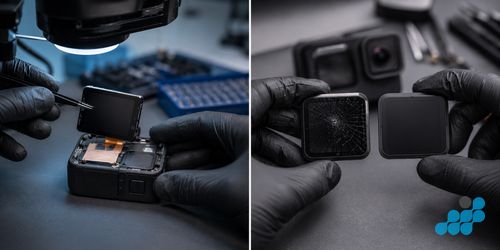
Will my GoPro still be waterproof after a screen repair?
Fresh sealing adhesive is fitted where required, but opening the camera can compromise its original seals. No independent repair can guarantee the manufacturer's water-resistance rating, so use a suitable waterproof housing for submersion.
Send your GoPro in for screen repair
Book at /repair/gopro, then remove the battery and SD card, wrap the GoPro in bubble wrap inside a rigid box, and include the booking reference and affected screen. Arrange tracked, adequately insured inbound carriage. We diagnose under the stated terms, confirm the price, fit the matched assembly, test, and return it under the delivery terms shown for the order with the applicable guarantee logged.
Remove the SD card and any mount; the lens cover is the most impact-sensitive part — pack screen-side against foam.
Is a GoPro screen repair worth it?
A screen repair can restore the camera's display and controls without replacing the whole device. Whether it is economical depends on the model and any additional faults, so we diagnose under the stated terms and confirm the price before you commit. The fitted part and workmanship carry the applicable guarantee; original water resistance is not guaranteed.
Frequently asked questions
How much does GoPro screen replacement cost in the UK?
A rear touchscreen runs from £44.95 (Hero 7 White) to £89.95 (Hero 13 Black); a front display, where the model has one, from £39.95 to £59.95. Every screen repair carries the 27-month guarantee. See the table above.
Can a GoPro Hero screen be repaired, or does the whole camera need replacing?
It can nearly always be repaired. The screen is a bonded assembly that we swap as a unit, restoring both display and touch — the camera body and all its other components stay in place.
Will a repaired GoPro screen still be waterproof?
Fresh sealing adhesive is fitted where required, but opening the camera can compromise its original seals. No independent repair can guarantee the manufacturer's water-resistance rating, so use a suitable waterproof housing for submersion.
Is the Hero 13 Black front screen replaceable?
Yes — the front display on the Hero 13 Black is a separate replaceable part at £59.95, distinct from the rear screen. Breaking it does not require replacing the rear screen too.
Will I lose my footage or settings when the screen is replaced?
A screen replacement is a display-assembly swap, but no repair is risk-free. Remove the SD card and back up camera settings before posting where possible.
What should I do if my GoPro screen has gone black but the camera still records?
Power it off, remove and reseat the battery, and try a fresh charge first — occasionally a blank screen is a loosened ribbon or a power state rather than a cracked panel. If it stays black, post it in; the diagnostic confirms whether it is the panel or the ribbon before you commit.