Google Pixel Repair by Post UK 2026 — How Mail-In Works
Direct answer: celltech offers supported Google Pixel repairs UK-wide by post. Book the exact model and fault, then arrange suitable tracked inbound postage using the order instructions. Repair and return-delivery terms, including the applicable guarantee tier, are shown or confirmed for the order.
Back up important data where possible. Many repairs do not require a reset, but no repair is risk-free for data.
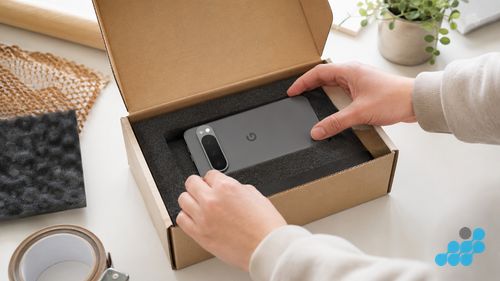
Why Pixel owners choose mail-in repair
Pixel spares are harder to come by than Samsung's, the Super Actua Pro panels want a heated platen, and the bonded glass backs need patient, controlled heat to lift without splitting — so the bench that handles Pixels regularly is almost never the shop on your local parade. Posting the phone places it with a technician who lives inside the platform, and since the price is published before any work begins, there is no leap of faith in dropping it into the box.
The celltech mail-in process
- Book online at /repair/phone/google and receive a repair reference number.
- Back up through Google One and ready the device — our backup guide covers it.
- Pack the Pixel following the slim-chassis and glass-back notes further down.
- Post it using the completed-order instructions — choose a carrier that accepts the phone and offers suitable tracking and compensation under its current terms.
- Approve the quote — we inspect the phone and, where the price was not set at booking, confirm the exact figure before any work.
- Receive it back repaired, returned under the order terms, with the guarantee recorded against your reference.
How to pack a Pixel safely for posting
- Wrap the phone in bubble wrap inside a rigid box — a padded envelope alone is not enough for a slim glass-and-metal handset.
- Leave the Google retail box out of it; recognisable packaging invites interference along the way.
- Remove loose cables and take out your SIM card.
- Glass-back note: the Pixel Pro models have fragile glass rears — build up the corners so a slim chassis cannot take a hit at the back and spread an existing crack.
- High-value note: a Pixel 9 Pro XL or Pixel 10 Pro can exceed Royal Mail Special Delivery's standard compensation cover — buy enough cover for the handset's value and keep your proof of postage.
Full detail in our packing guide.
Do I need to remove my Google account?
It is recommended where the device remains usable. Signing out can prevent Factory Reset Protection from blocking agreed post-repair testing. Back up accessible data first. Access is limited to what is agreed and reasonably needed for testing, and we do not request your Google Account password. Any reset requirement must be explained and agreed before it is performed.
What we repair for Pixel owners by post
- Screen replacement across the Pixel range, including Super Actua Pro panels and the Fold inner displays.
- Battery replacement — especially the Pixel 6/7 series.
- Back glass replacement, preserving the wireless charging coil.
- Charging port repair (quoted per model).
Your guarantee
Screens, batteries and back glass carry 27 months. Charging-port and connector repairs carry 9 months; any board-level or liquid-damage work carries 120 days. The tier is matched to the repair type, never a blanket figure. See our warranty guide.
How mail-in compares with the alternatives
A Pixel owner can compare an appropriate local service, the manufacturer's current route and a mail-in specialist. Mail-in to celltech provides model-specific booking without requiring a nearby shop. Choose suitable tracked inbound postage; return delivery follows the order terms. Our is it safe to post a phone guide explains the transit precautions.
What happens to your Pixel once it arrives
A mail-in repair only earns confidence when the intake never cuts corners, and that consistency is precisely why it works for Pixel: a 6a, a 9 Pro and a Fold all move through the same sequence. The instant the tracked parcel is signed in, the phone is matched to your reference, photographed in its arrival state, and set onto the bench. The opening move is a diagnostic rather than a repair — the technician verifies the fault is the one you flagged, sweeps for the secondary damage a drop tends to leave, and only then attaches a price. If the figure agreed at booking still covers it, we continue; if the inspection turns up something unexpected, we pause and contact you before opening anything.
After that, the method suits the fault. A laminated OLED assembly is warmed open, parted with picks and re-bonded on fresh optically clear adhesive; a glass back is eased off under controlled heat with the wireless charging coil kept intact; an aged cell is exchanged for an OEM-grade, cycle-rated replacement. With the work complete, the phone is run through a function check — touch, brightness, charge behaviour, fingerprint — then returned under the order terms with the guarantee logged. Because you signed out of your Google account beforehand and disabled Factory Reset Protection, we can test it through without being locked out. The broader walkthrough is in our how mail-in repair works guide.
Which Pixel faults mail-in suits best
Almost every routine Pixel fault posts well, and three are where the service truly proves itself. Screen replacement — whether a Pixel 6a Actua panel or a Pixel 9 Pro Super Actua flagship — comes through the post intact; see our Pixel screen replacement page. Battery replacement is most common on the much-reported Pixel 6 and 7 generations and is clean rear-entry work; see our Pixel battery replacement page. And charging-port repair, led by diagnosis so you never pay for work the checks rule out, sits on our Pixel charging port repair page.
The one category to flag before posting is suspected liquid or board-level damage. Such faults need a bench diagnostic that may land at the 120-day tier rather than a clean component repair, so it is worth a message first — and if a phone proves to be carrying cascading damage, we will weigh it honestly against the beyond-economical-repair threshold rather than charge for a repair that cannot hold.
Is your data safe in the post?
Screen, battery and back-glass repairs do not normally require storage replacement, but every repair carries data risk. Make a current backup where possible. Any access or reset required for diagnosis is explained and agreed; Celltech will not ask for a Google Account password. See our backup guide and remove the SIM before posting unless it is needed for an agreed test.
What happens once your Pixel arrives — and what we test before it leaves
When the parcel arrives, the Pixel is booked to your repair, photographed and run through diagnosis before any work starts or price is confirmed. The part grade is agreed first: OEM-grade or genuine, never an ungraded copy that would dim the OLED or shift its colour calibration. The repair is then matched to the model: a flat Pixel OLED separated on a heated platen, a Tensor-era battery swapped for a cycle-rated cell, or a worn USB-C port micro-soldered rather than treated as disposable.
Before it ships, every Pixel clears a function pass shaped around the repair — display uniformity, colour and touch on a screen; a clean seal and accurate charge reporting on a battery; a steady, debris-free connection on a port; full biometrics and a charge cycle for board work. Only then does it travel home under the order's return terms. That closing verification underwrites the tiered guarantee and returns the same handset rather than a refurbished swap; back up first because no repair is risk-free for data.
Frequently asked questions
How do I send my Google Pixel for repair by post?
Book online, pack the device in a rigid box with bubble wrap, remove the SIM, and post using suitable tracked postage arranged from the order instructions to the celltech workshop. We have a full packing guide.
Is it safe to send a Pixel 9 Pro by post?
Yes, with the right packaging and service. The glass back needs extra bubble wrap, and Royal Mail Special Delivery is tracked, signed and insured — though a high-value Pixel may exceed the standard cover, so buy enough and keep your proof of postage.
Do I need to remove my Google account before sending?
It is recommended where the device remains usable because Factory Reset Protection can block agreed testing. Back up accessible data first; access is limited to what is agreed and reasonably needed, and we do not request your Google Account password.
What if my Pixel is lost or damaged in transit?
Royal Mail Special Delivery includes compensation for loss or damage. Retain your proof of postage and contact us immediately — we will work with you to resolve it.
What repairs can I get done by post for a Pixel?
Screen, battery, back glass and charging-port repairs are all available by post. See the Pixel repair cost hub for pricing.
How does the 27-month guarantee work on a mail-in repair?
The guarantee starts from the date your device is returned. If the repaired component fails within 27 months due to a workmanship or parts issue, we repair it again at no cost.