Dell Laptop Battery Replacement Cost UK 2026: Inspiron, XPS & Latitude Prices
Direct answer: Dell laptop battery replacement costs differ across the Inspiron, XPS and Latitude ranges. An Inspiron battery runs from £49.95 on an older 15 up to £99.95 on an Inspiron 16 Plus, an XPS battery from £64.95 to £129.95, and a Latitude from £54.95 to £119.95. Older Inspiron models with accessible battery bays are simpler to service than the glued-in cells in newer XPS and Inspiron 7000 units. All prices below are taken directly from our live price list, and each repair carries a 27-month guarantee. A swollen or bulging battery is a safety issue — stop using the device and arrange repair promptly.
A Dell laptop battery rarely fails dramatically — it fades, holding a little less charge each month until a machine that once ran for hours now dies at 40%, or it bulges, swelling the chassis and the trackpad until the cell is visibly pressing against the casing. Both send owners hunting for a price, and the swollen case is the one that cannot wait. The exact fitted price for the Inspiron, XPS and Latitude ranges, which models carry an accessible pack versus a glued internal cell, and what to do the moment you spot a bulge are below. For the full Dell picture, see our Dell laptop repair cost hub.

Dell laptop battery replacement prices
Prices are fitted by post, including the OEM-grade cell, labour; return delivery follows the order terms, and each carries a 27-month guarantee. Where your exact model is not listed, contact us for a quote.
Inspiron — accessible and internal packs
| Model | Battery access | Battery price |
|---|---|---|
| Inspiron 16 Plus 7640 (2025) | Internal / glued | £99.95 |
| Inspiron 14 Plus 7440 (2025) | Internal / glued | £89.95 |
| Inspiron 15 3530 (2024) | Internal panel | £74.95 |
| Inspiron 15 5000 (2020) | Internal panel | £69.95 |
| Inspiron 15 5570 (2018) | Internal panel | £59.95 |
| Inspiron 15 5000 (2017) | Internal panel | £54.95 |
| Inspiron 15 3576 (2018) | Internal panel | £49.95 |
XPS — glued internal cells
| Model | Battery access | Battery price |
|---|---|---|
| XPS 16 9640 (2025) | Internal / glued | £129.95 |
| XPS 14 9440 (2025) | Internal / glued | £119.95 |
| XPS 13 9350 (2025) | Internal / glued | £119.95 |
| XPS 15 9530 (2023) | Internal / glued | £109.95 |
| XPS 15 9500 (2020) | Internal / glued | £79.95 |
| XPS 13 9360 (2017) | Internal / glued | £64.95 |
Latitude — business internal packs
| Model | Battery access | Battery price |
|---|---|---|
| Latitude 7460 (2025) | Internal | £119.95 |
| Latitude 5460 (2025) | Internal | £109.95 |
| Latitude 7440 (2023) | Internal | £99.95 |
| Latitude 5400 (2019) | Internal | £64.95 |
| Latitude 5480 (2017) | Internal | £54.95 |
Swollen Dell battery: what to do
Lithium laptop batteries can swell as they age, and Dell Inspiron and XPS units are no exception. If your laptop's base is bulging, the trackpad is lifting, or the machine will not sit flat, the cell has swollen — that is a fire and puncture risk, and it needs handling correctly. Stop using the device immediately, do not attempt to remove the cell yourself (a punctured cell is dangerous), and do not force a swollen laptop shut to pack it. Contact celltech before posting so we can advise on safe packaging for your specific machine, because a swollen pack can be pierced by ordinary transit knocks.
Once a swollen Dell is on the bench, safe removal is routine for us: the case is opened, the bloated cell is worked loose with the technique that keeps it intact rather than punctured, and a matched OEM-grade pack takes its place before the gauge is re-taught to read true again. Because a swelling cell presses on everything above it, we look over the trackpad, palmrest and chassis for distortion before the laptop is closed.
Signs your Dell battery needs replacing
- Won't hold charge past 30 minutes — the classic end-of-life fade.
- Sudden shutdowns at 20–40% — the reported capacity no longer matches reality.
- Base bulging or trackpad lifting — a swollen cell; treat as urgent.
- Battery health "poor" or "needs replacement" — Dell SupportAssist's battery health readout is a useful consumer check; a multimeter pack voltage test on the bench confirms it.
- Laptop only runs on mains power — the cell will no longer deliver power at all.
Glued-in vs accessible Dell batteries
Battery access is what most changes the labour — and a little of the price — across the Dell range. Older Inspiron 15 3000/5000 models expose the pack behind a removable back panel, so it is genuinely accessible: panel off, lead disconnected, tired cell out, fresh cell in, gauge recalibrated. That keeps these repairs at the simpler, lower end of the price band. Newer Inspiron 14/15 7000 units, every XPS, and the Latitude range bond or rivet the cell inside a slim chassis, so reaching it safely is a full base strip-down — soft heat, a plastic spudger and patience. Hurry a glued cell and you crack a cover or pierce the battery, which is exactly why this work stays on the bench.
The gap in price between an accessible and a glued pack is modest — the cell is the main cost either way — but the skill and safety the glued cells demand is why they are no home job. Whichever design it is, once the new OEM-grade cell is in we recalibrate the gauge so the reported capacity and run-time reflect the new pack rather than the worn one's stale figures.
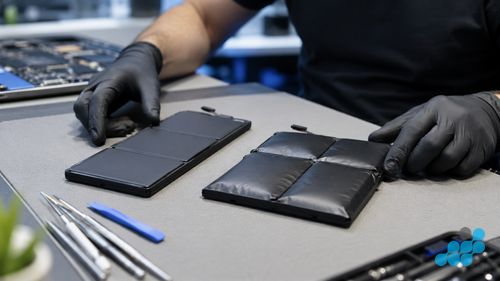
OEM-grade vs aftermarket Dell batteries
The cells we source are OEM-grade, specified to Dell's original capacity, voltage and rated cycle life, and we tell you exactly which part is going in before work begins. A cheap aftermarket cell saves a few pounds and then betrays you: short capacity out of the box and an earlier swell — ruinous in a glued XPS, where the next bloat buys you the same costly teardown a second time. A properly matched cell gives back the original hours and ages without drama. See our parts-grade guide.
Dell battery replacement by post
celltech is a UK-wide mail-in specialist. Book at /repair/laptop/dell, pack your Dell securely and send it using suitable tracked postage arranged from the order instructions, with compensation cover appropriate for the device — and if the battery is swollen, contact us first for safe-packaging guidance — and we diagnose under the stated terms, confirm the exact price, fit the OEM-grade cell, test the run-time under load, and return it under the delivery terms shown for the order with your 27-month guarantee logged. See our Dell repair by post guide.
Post the laptop in a rigid box with corner foam; avoid the branded Dell box.
Other Dell laptop repairs
For the full per-model price tables across Inspiron, XPS and Latitude, see our Dell laptop repair cost hub — or the screen replacement and is-it-worth-repairing pages.
What a Dell battery replacement actually involves
Dell's bench process forks at the access point. An Inspiron with a serviceable bay is the gentle case: we lift the back panel, unclip the battery lead, draw the spent cell from its recess, drop in the OEM-grade replacement, reconnect, and clear the gauge so it stops quoting the old cell's tired numbers. It is tidy, predictable work, and it is why those Inspirons sit low in the table. Before any of it we read the pack with a multimeter — a cell holding near-rated voltage but folding under load has simply lost capacity, while one sitting far below rated voltage hints at something deeper worth chasing before we commit to parts. Dell's own battery-health screen in the BIOS, reached through the F2 setup menu at boot, is a useful cross-check on what the meter shows.
A glued internal cell — every XPS, the newer Inspiron 7000s, the Latitudes — begins with coaxing the bottom case off without a casualty. Gentle heat softens the adhesive line and a plastic spudger walks it open; force it and you split a cover or, far worse, nick a swollen cell. With the pack exposed the lead comes off and the cell is eased from its adhesive bed using the technique that keeps it whole rather than pierced, then the new OEM-grade pack is bedded, secured and the controller cleared. The whole machine then runs down under load, because a gauge that proudly shows 100% and then quits at 40% is a controller that was never properly relearned — not a job we would sign off.
A swollen Dell follows the same route but slower, and with an eye on the collateral. Bloating cells shove hard against whatever sits above them, so once the old pack is safely out we check the trackpad, the palmrest and the chassis for the warping that swelling leaves behind, and quote anything we find alongside the cell — so the laptop comes back genuinely sorted, not merely recharged.
Repair the battery or replace the laptop?
Almost always repair. A Dell whose processor, screen and storage are all sound is worth far more than a tired battery makes it feel, and a fresh OEM-grade cell hands back full portability for a sliver of replacement money. The honest exception is the machine stacking faults — a worn battery and a cracked screen and a dying keyboard at once — where the bill starts nudging the price of a new laptop. When that happens we put the arithmetic in front of you at the diagnosis and let you call it, rather than talk you into a repair that does not add up. For a lone battery fault, even on a four-year-old Inspiron, restored run-time usually pays the repair back within months — and our 27-month guarantee, keeps the new cell covered deep into its working life.
Frequently asked questions
How much does Dell Inspiron battery replacement cost in the UK?
From £49.95 on an older Inspiron 15 up to £99.95 on an Inspiron 16 Plus, with the common current Inspiron 15 3530 (2024) at £74.95. Every model's price is in the table above, fitted with an OEM-grade cell under the 27-month guarantee.
Is a swollen Dell laptop battery dangerous?
Yes — a bulging lithium cell is both a fire and a puncture hazard. Power the Dell down, leave the cell where it is rather than levering it out, do not squeeze the lid shut over the bulge, and message us before you post it so we can talk you through safe packaging.
Can celltech replace a Dell XPS battery by post?
Yes. An XPS cell is glued in and needs a full base teardown, so it is strictly bench work — but the postal side is unchanged: book it, follow the completed-order instructions for inbound carriage, and we fit an OEM-grade cell and return it under the 27-month guarantee.
How do I know if my Dell battery needs replacing?
Tell-tale signs are a collapsed run-time, abrupt shutdowns around 20–40%, a battery-health warning in Dell SupportAssist or the BIOS battery screen, a laptop that only lives on mains, or a swelling base. A multimeter voltage test on the bench settles it.
Will a replacement Dell battery last as long as the original?
With an OEM-grade cell matched to the original capacity and cycle life, yes. It is the aftermarket substitutes that fall short and age early, which is why they never go into our Dells — least of all the glued-shut models.
Can I replace my Dell laptop battery myself?
On an older Inspiron with a removable back panel, an owner can manage the swap. On any glued cell — every XPS, the newer Inspiron 7000s, the Latitudes — it means a full base teardown with puncture risk on a swollen pack, so we keep that one on the bench.