Dell Laptop Keyboard Replacement Cost UK 2026: Inspiron, XPS & Latitude Prices
Direct answer: Dell laptop keyboard replacement costs depend on whether your model uses a standalone keyboard deck or a keyboard-integrated palmrest assembly. Older Inspiron 15 3000/5000 models have a removable deck and run from £54.95; newer Inspiron 7000 and all XPS models integrate the keyboard into the palmrest top-case and run up to £159.95; Latitude sits £74.95–£139.95. Backlit models cost marginally more. All prices below are from our live price list, and each repair carries a 27-month guarantee. Liquid damage should be assessed promptly to stop corrosion spreading to the motherboard.
The laptop still boots and the screen is fine, but you cannot type a sentence on it — a Dell keyboard fault is disruptive precisely because the machine works yet becomes unusable. The cause is usually a spill, a dropped corner that has cracked a key, or age-related failure of individual keys or the backlight, and what you pay turns on a single Dell-specific fork: whether your model carries a standalone keyboard deck that lifts out, or a keyboard riveted into a palmrest top-case that has to go back as one assembly. Older Inspirons fall on the affordable side of that line, the newer Inspirons and every XPS fall on the dear side, and Latitude straddles both — which is why two seemingly similar jobs can sit only a few pounds apart. The fitted price for each model is laid out below, with the deck-versus-assembly split spelt out so the quote you get is no surprise. For the full Dell picture, see our Dell laptop repair cost hub.
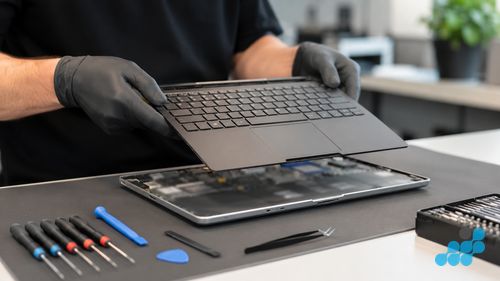
Dell keyboard replacement prices
Prices are fitted by post, including the OEM-grade keyboard or assembly, labour; return delivery follows the order terms, and each carries a 27-month guarantee. Where your exact model is not listed, contact us for a quote.
Inspiron — decks and palmrest assemblies
| Model | Keyboard type | Keyboard price |
|---|---|---|
| Inspiron 16 Plus 7640 (2025) | Palmrest assembly | £119.95 |
| Inspiron 14 Plus 7440 (2025) | Palmrest assembly | £109.95 |
| Inspiron 15 3530 (2024) | Palmrest assembly | £89.95 |
| Inspiron 14 5430 (2023) | Palmrest assembly | £89.95 |
| Inspiron 15 5000 (2020) | Standalone deck | £79.95 |
| Inspiron 15 5570 (2018) | Standalone deck | £69.95 |
| Inspiron 15 5000 (2017) | Standalone deck | £64.95 |
| Inspiron 15 3576 (2018) | Standalone deck | £59.95 |
XPS — backlit palmrest assemblies
| Model | Keyboard type | Keyboard price |
|---|---|---|
| XPS 16 9640 (2025) | Backlit palmrest | £159.95 |
| XPS 14 9440 (2025) | Backlit palmrest | £149.95 |
| XPS 13 9350 (2025) | Backlit palmrest | £149.95 |
| XPS 15 9530 (2023) | Backlit palmrest | £139.95 |
| XPS 15 9500 (2020) | Backlit palmrest | £109.95 |
| XPS 13 9360 (2017) | Backlit palmrest | £94.95 |
Latitude — business decks
| Model | Keyboard type | Keyboard price |
|---|---|---|
| Latitude 7460 (2025) | Backlit deck | £139.95 |
| Latitude 5460 (2025) | Backlit deck | £129.95 |
| Latitude 7440 (2023) | Backlit deck | £119.95 |
| Latitude 5400 (2019) | Standalone deck | £84.95 |
| Latitude 5480 (2017) | Standalone deck | £74.95 |
Standalone keyboard deck vs palmrest assembly
Dell draws this line in a place all its own, and it decides what you pay. Older Inspiron 15 3000 and 5000 machines carry a standalone keyboard deck — a discrete module that releases from the palmrest on its own, so the fix is a single component and the bench time is short. Step up to a newer Inspiron 7000 or any XPS and the keyboard is bonded into the palmrest top-case; a "keyboard replacement" there is really a top-case swap, with the trackpad, the power button and often the fingerprint reader all riding on the same part. The Latitude line sits between the two — built for field service, it frequently takes a deck on its own, and on a sound deck a popped keycap and its scissor clip can sometimes be re-seated rather than replaced wholesale.
The model and its service tag tell us which build you are holding, and we confirm it at the diagnosis before a screwdriver is lifted — so a job booked as a deck is never rewritten as a palmrest assembly once the machine is open.
Backlit vs non-backlit keyboards
A backlit keyboard costs marginally more to replace than a non-backlit one, because the LED lighting layer is integrated into the keyboard assembly and the connector carries the backlight control alongside the key matrix. The XPS line and Inspiron 7000 variants are backlit as standard; budget Inspirons and older Latitude 5000 series are often non-backlit. We test the backlight after fitting — every key lit evenly, no dead zones — as part of the standard function test.
When does a Dell keyboard need replacing?
- Sticky or unresponsive keys after a spill — liquid has entered the key matrix.
- Keys registering wrong characters — a matrix short, often post-spill.
- Backlight not working — the lighting layer or its control has failed.
- Broken or snapped keycaps — physical damage from a drop or a prised key.
- Whole rows dead — a ribbon-cable or matrix failure across the board.
Dell keyboard liquid damage
Spills account for more dead Dell keyboards than anything else, and the keyboard is the cheap part of the problem. The real cost is the corrosion that creeps from the spill site into the board beneath and keeps working long after the laptop feels dry — which is exactly why "leave it in a bag of rice" is the worst advice going. Heat is no better: a radiator or hairdryer bakes the residue on and can warp components. On the bench we put the board under magnification, flush the affected area with isopropyl, and work out whether the damage stops at the keyboard or has reached the logic board — two different repairs at two different prices. Liquid and board-level work carries the 120-day tier. Our common Dell faults guide has the wider diagnosis.
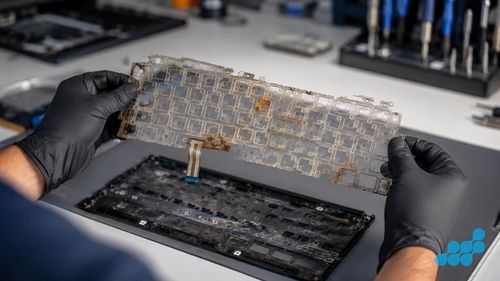
What a Dell keyboard replacement actually involves
A standalone-deck Inspiron is the quick end of the work: the deck unclips or unscrews, the ribbon lifts from its connector, an OEM-grade keyboard drops in, the ribbon re-seats, and each key is checked for register and for backlight where it is fitted. A palmrest-assembly model — newer Inspiron 7000 and every XPS — is a deeper job: the base is opened, every connector running into the palmrest is released (keyboard, trackpad, power button, sometimes fingerprint), the old top-case is lifted out and the new one fitted, and each of those connectors is re-secured before the chassis closes. That extra part and extra labour are the gap you see between the deck prices and the assembly prices above. Before it ships, we run every key, the trackpad, the power button and the backlight.
Dell keyboard replacement by post
celltech is a UK-wide mail-in specialist. Book at /repair/laptop/dell, pack your Dell securely and send it using suitable tracked postage arranged from the order instructions, with compensation cover appropriate for the device, and we diagnose under the stated terms, confirm whether the scope is a deck or a palmrest assembly, fit the OEM-grade part, test every key, and return it under the delivery terms shown for the order with your 27-month guarantee logged. See our Dell repair by post guide.
Post the laptop in a rigid box with corner foam; avoid the branded Dell box.
Other Dell laptop repairs
For the full per-model price tables, see our Dell laptop repair cost hub, and the focused battery replacement and screen replacement pages.
Keyboard repair vs a new laptop, and how Dell compares
A keyboard is one of the few faults that can make an otherwise-perfect laptop feel worthless — but it is also one of the lowest-priced major repairs relative to the value it restores. A £69.95 deck on an older Inspiron, or a £139.95 palmrest assembly on an XPS, returns a premium machine to full typing duty for a fraction of its replacement cost, under the 27-month guarantee. The decision only tilts towards replacement when a keyboard fault is bundled with other expensive failures — a cracked screen and a dead battery on the same machine — in which case we lay out the combined cost at the diagnosis and let you judge. On its own, a Dell keyboard repair almost always makes sense.
It is worth being direct about how Dell compares with other routes. Dell's own service, out of warranty, typically resolves a keyboard fault by replacing the whole top-case assembly through a depot — the same part, but with an opaque quote, transit time, and a shorter repair warranty than celltech's 27 months on the work. An unauthorised high-street shop may quote a "keyboard replacement" without distinguishing a deck from a palmrest assembly, which is how owners get surprised by a scope change mid-repair. celltech names the scope up front — deck or assembly, the exact model's price, the tiered guarantee — before any work starts, so the figure you book is the figure you pay. For the wider Dell range, see how this sits alongside screen and battery work.
Frequently asked questions
How much does Dell Inspiron laptop keyboard replacement cost in the UK?
From £59.95 on an older Inspiron 15 with a standalone deck up to £119.95 on an Inspiron 16 Plus with a palmrest assembly, with the common current Inspiron 15 3530 (2024) at £89.95. Each repair carries a 27-month guarantee.
Can you replace individual keys on a Dell laptop, or does the whole keyboard go?
On a standalone-deck model a snapped keycap can sometimes be replaced individually, but a matrix or multi-key failure means the whole deck. On a palmrest-assembly model — newer Inspiron 7000 and all XPS — the whole assembly is the unit. We quote the correct scope up front.
My Dell laptop keyboard stopped working after a spill — can it be saved?
Often yes, but assess it promptly. The keyboard is replaceable; the real risk is corrosion spreading to the motherboard beneath. We inspect the board under magnification, clean affected areas, and quote keyboard-only or board-level work as the damage dictates.
Does celltech repair Dell laptop keyboards by post?
Yes. Book online, follow the completed-order instructions for inbound carriage, and we diagnose under the stated terms, fit an OEM-grade keyboard or palmrest assembly, test every key, and return it under the 27-month guarantee.
Is a backlit keyboard replacement more expensive on a Dell XPS?
Marginally — the LED lighting layer is integrated into the assembly. The bigger driver on an XPS keyboard price is the palmrest-assembly construction itself, not the backlight, though both contribute.
How do I know if my Dell keyboard needs replacing or just cleaning?
A clean fixes sticky keys caused by debris. If keys register wrong characters, whole rows are dead, or the backlight has failed, the keyboard or its assembly needs replacing. We confirm which at the diagnosis.